

Close Menu

    Subscribe to Updates

    Get the latest creative news from FooBar about art, design and business.

    What's Hot

    Reid Hoffman Wants Silicon Valley to ‘Stand Up’ Against the Trump Administration

    January 13, 2026

    Smartphone Camera Scores Explained: Are DxOMark Rankings Really Reliable?

    January 13, 2026

    Samsung Pushes Galaxy Watch 8 (2025) to Its Lowest Price in New Year Clearance, While Apple Watches Stay Full Price

    January 13, 2026
    Facebook X (Twitter) Instagram
    Thursday, January 15
    Facebook X (Twitter) Instagram YouTube Mastodon Tumblr Bluesky LinkedIn Threads
    ToolcomeToolcome
    • Technology & Startups

      Reid Hoffman Wants Silicon Valley to ‘Stand Up’ Against the Trump Administration

      January 13, 2026

      Urevo SpaceWalk 5L Walking Pad Review: Compact and Affordable

      January 13, 2026

      Board Review: Tabletop Video Games With Physical Pieces

      January 13, 2026

      Atonemo Streamplayer Review: Make Old Speakers New Again

      January 13, 2026

      What to Do If ICE Invades Your Neighborhood

      January 13, 2026
    • Science & Education

      Hubble Nets Menagerie of Young Stellar Objects

      January 13, 2026

      Ötzi the Iceman mummy carried a high-risk strain of HPV, research finds

      January 13, 2026

      Can you eat too much protein?

      January 13, 2026

      NASA’s Webb Delivers Unprecedented Look Into Heart of Circinus Galaxy

      January 13, 2026

      Backcountry is blowing out hiking bags, backpacks, and luggage for up to 65% off during this clearance sale

      January 13, 2026
    • Mobile Phones

      Smartphone Camera Scores Explained: Are DxOMark Rankings Really Reliable?

      January 13, 2026

      Motorola expands Android 16 beta program to 8 more devices

      January 13, 2026

      Motorola Introduces Moto Pen Ultra for Foldables and Moto Tag 2 Item Tracker

      January 13, 2026

      OnePlus Nord CE 5 Update Adds Video Editing Tools and January Security Patch

      January 13, 2026

      Vivo rolls out OriginOS 6 (Android 16) update to Vivo V40

      January 13, 2026
    • Gadgets

      Star Wars Outlaws developer Massive Entertainment and Ubisoft Stockholm face layoffs

      January 13, 2026

      Insta360 releases AI-powered follow-up to its Link webcams

      January 13, 2026

      Proton’s Lumo AI chatbot now has an encrypted space for your projects

      January 13, 2026

      The best streaming devices for 2026

      January 13, 2026

      UK regulator Ofcom opens a formal investigation into X over CSAM scandal

      January 13, 2026
    • Gaming

      Samsung Pushes Galaxy Watch 8 (2025) to Its Lowest Price in New Year Clearance, While Apple Watches Stay Full Price

      January 13, 2026

      ASUS ROG Xbox Ally (2025 Ryzen Z2 A) Just Hit Its Lowest Price Ever With 3 Months of Game Pass Included

      January 13, 2026

      Samsung Goes All-In on Galaxy S25 Ultra Clearance at a Record Low as the New S26 Launch Approaches

      January 13, 2026

      This Great Switch 2 Handheld Controller Is On Sale For New Best Price At Amazon

      January 13, 2026

      Google Pixel 9a Drops to All-Time Low to Compete With Samsung Galaxy S25 Deals, Now the Cheapest Gemini-Powered Smartphone

      January 13, 2026
    • Cars

      Beyond Speed: A Deep Dive into the 6 Safety Features That Could Save Your Supercar in 2026

      January 13, 2026

      A Commercial Truck Caused a Hit-and-Run: Who Pays for the Damage?

      January 13, 2026

      Risk and reward: what driving teaches about smart decisions

      January 13, 2026

      How It’s Played Online on GameZone

      January 12, 2026

      How Dubai Became the Supercar Capital of the World

      January 12, 2026
    • PC Accessories

      A Kilowatt PSU Is So 2025, The Seasonic Prime PX-2200 Is The Future

      January 12, 2026

      CES 2026: The Good, Bad And Ugly

      January 12, 2026

      Hands-On With Samsung Galaxy Z TriFold: An Impressive New Take On Foldables

      January 11, 2026

      Edifier’s Funky Portable ES300 Wireless Speaker

      January 9, 2026

      Testing All The Features of AMD’s FSR Redstone

      January 9, 2026
    ToolcomeToolcome
    Home»Gadgets»How to add someone to an Apple Family account
    Gadgets

    How to add someone to an Apple Family account

    November 16, 2025No Comments5 Mins Read0 Views
    Facebook Twitter Pinterest LinkedIn Telegram Tumblr Email
    Share
    Facebook Twitter LinkedIn Pinterest Email


    Apple’s Family Sharing feature is designed to make digital life simpler for households that use multiple Apple devices. It links individual Apple IDs under one family group so everyone can share subscriptions, purchases and storage without sacrificing personal privacy. A single organizer manages the group and decides who’s invited, what’s shared and how payments are handled. Once someone joins, they can access shared Apple services like Music, TV+, iCloud+, Fitness+ or Arcade, along with any compatible third-party apps that support Family Sharing.

    Setting it up only takes a few minutes, but understanding how it works makes it far easier to manage long-term. Whether you’re adding a new partner, a roommate or creating an Apple ID for a child, the process is similar across iPhone, iPad and Mac, and each person keeps their own private account within the shared ecosystem.

    Getting started with Family Sharing

    Before adding someone new, make sure you’re the organizer of the family group. The organizer controls invitations and payment preferences, while each member uses their own Apple ID to sign in. You can manage everything from the Settings app on iPhone or System Settings on Mac. It’s worth checking for software updates first, since Family Sharing menus can vary slightly between iOS versions.

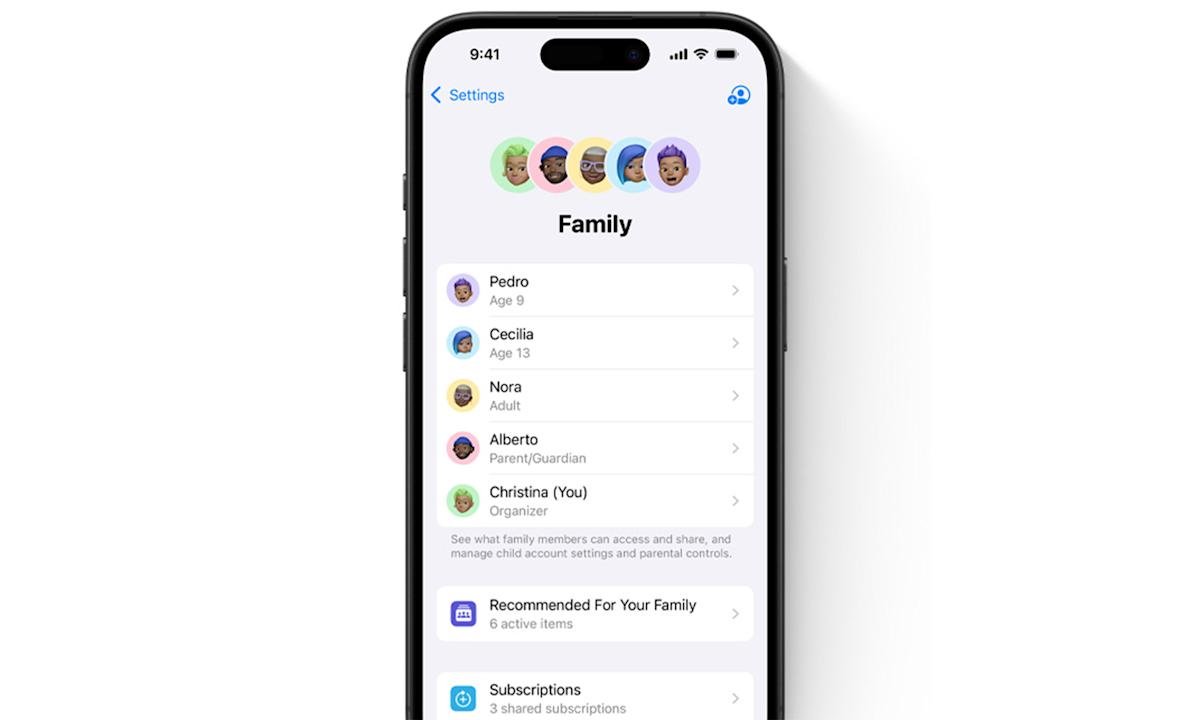
    When you’re ready, open Settings, tap your name at the top then select Family. From there, you’ll see a summary of your group, any shared subscriptions and the option to add new members. Apple will ask whether you’d like to invite an existing user or create an account for a child who doesn’t yet have an Apple ID. Invitations can be sent through Messages, Mail or AirDrop, and if the person is nearby, you can let them enter their details directly on your device.

    On a Mac, the process looks a little different but leads to the same result. Open System Settings, select your name then choose Family. You can then add a member, send an invite or set up a child account with appropriate parental controls. Once the invitation is accepted, the person automatically appears in your group list.

    How to manage what’s shared with Family Sharing

    When someone joins, they instantly gain access to the subscriptions and features that the organizer has made available. That can include Apple Music, Apple TV+, Apple Arcade and Apple Fitness+, along with the shared iCloud+ storage plan if you have one. Photos, calendars and location information can also be shared through the Family section of the Settings app, letting everyone see joint reminders, events or device locations through Find My.

    If purchase sharing is enabled, everyone in the group can use the organizer’s payment method for App Store and iTunes purchases. Each transaction is still tied to the buyer’s own Apple ID, but it’s billed to the organizer’s payment method. It’s entirely optional, and you can disable it if you’d prefer each person to pay separately. Shared purchases can still be re-downloaded by other members from their purchase history without paying again, so long as the app or media supports Family Sharing.

    Parents also gain access to tools like Screen Time and Ask to Buy, which give them oversight of a child’s activity. These options appear automatically when you create a child account and can be fine-tuned later from the organizer’s device. For example, Ask to Buy can send a notification each time a child tries to install a new app or make an in-app purchase, letting the organizer approve or decline it in real time.

    Inviting children and setting boundaries

    Creating an account for a child works slightly differently from inviting an adult. Apple requires a parent or guardian to set up the account directly from their own device, adding the child’s name, birthday and Apple ID credentials during setup. The age you enter determines what privacy and parental-control features are switched on by default, such as limits on explicit music or app downloads.

    Once the child’s account is created, it behaves like any other Apple ID but remains tied to the family group until the child reaches the minimum age to leave or until the organizer removes them. Screen Time reports, purchase requests and content restrictions can all be adjusted as the child gets older. It’s a flexible way to give kids their own Apple ID and access to family-purchased content without sharing login details.

    Common issues and how to fix them

    Most people can add members without any problems, but sometimes the invitation process can stall. If the person you’re inviting doesn’t see the request, resend it from the Family settings and ask them to check their Messages or Mail. Invitations occasionally end up in spam folders or are filtered by older devices. If they’ve previously joined a different Family Sharing group, they’ll need to leave that one before they can accept your invite.

    It’s also possible to hit the group limit. Family Sharing supports one organizer and up to five additional members, for a total of six people in one group. If you try to invite more, you’ll be prompted to remove someone before adding another. And if the Family menu doesn’t show the option to add members at all, double-check that you’re signed in with the organizer’s Apple ID, as members without organizer privileges won’t see those options.

    If someone accepts but can’t see shared subscriptions, open the Subscriptions page under your Apple ID in Settings and ensure the toggle for “Share with Family” is switched on. For iCloud+ storage, confirm that the plan you’re sharing is large enough to include everyone’s data.

    Why Family Sharing is worth setting up

    Once everything is configured, Family Sharing can quietly simplify the way your household uses Apple’s ecosystem. Instead of juggling multiple subscriptions or repeating purchases, the organizer can consolidate everything in one place. Each member keeps their personal messages, photos and preferences, but benefits from shared apps, music and cloud storage. It’s also the easiest way to manage children’s digital habits while still giving them independence.

    Share. Facebook Twitter Pinterest LinkedIn Tumblr Email
    mehedihasan9992
    • Website

    Related Posts

    Star Wars Outlaws developer Massive Entertainment and Ubisoft Stockholm face layoffs

    January 13, 2026

    Insta360 releases AI-powered follow-up to its Link webcams

    January 13, 2026

    Proton’s Lumo AI chatbot now has an encrypted space for your projects

    January 13, 2026

    The best streaming devices for 2026

    January 13, 2026

    UK regulator Ofcom opens a formal investigation into X over CSAM scandal

    January 13, 2026

    This ElevationLabs 10-year extended battery case for AirTags is on sale for only $16

    January 13, 2026
    Leave A Reply Cancel Reply

    Top Posts

    Steam and Valve’s online games are down

    December 24, 2025129 Views

    773,000-year-old fossils found in Casablanca may be earliest common ancestor of modern humans and Neanderthals

    January 8, 202696 Views

    Get three months of Apple Music for only $1 right now

    December 5, 202542 Views
    Don't Miss

    Reid Hoffman Wants Silicon Valley to ‘Stand Up’ Against the Trump Administration

    January 13, 2026

    Reid Hoffman doesn’t do much in half measures. He cofounded LinkedIn, of course, and helped…

    Smartphone Camera Scores Explained: Are DxOMark Rankings Really Reliable?

    January 13, 2026

    Samsung Pushes Galaxy Watch 8 (2025) to Its Lowest Price in New Year Clearance, While Apple Watches Stay Full Price

    January 13, 2026

    Hubble Nets Menagerie of Young Stellar Objects

    January 13, 2026
    Stay In Touch
    • Facebook
    • YouTube
    • TikTok
    • WhatsApp
    • Twitter
    • Instagram
    Latest Reviews
    8.9

    Review: Dell’s New Tablet PC Can Survive -20f And Drops

    January 15, 2021

    Review: Kia EV6 2022 The Best Electric Vehicle Ever?

    January 14, 2021
    72

    Review: Animation Software Business Share, Market Size and Growth

    January 14, 2021
    Most Popular

    Steam and Valve’s online games are down

    December 24, 2025129 Views

    773,000-year-old fossils found in Casablanca may be earliest common ancestor of modern humans and Neanderthals

    January 8, 202696 Views

    Get three months of Apple Music for only $1 right now

    December 5, 202542 Views
    Our Picks

    Reid Hoffman Wants Silicon Valley to ‘Stand Up’ Against the Trump Administration

    January 13, 2026

    Smartphone Camera Scores Explained: Are DxOMark Rankings Really Reliable?

    January 13, 2026

    Samsung Pushes Galaxy Watch 8 (2025) to Its Lowest Price in New Year Clearance, While Apple Watches Stay Full Price

    January 13, 2026

    Subscribe to Updates

    Get the latest creative news from FooBar about art, design and business.

    Toolcome
    Facebook X (Twitter) Instagram YouTube Mastodon Bluesky
    • Home
    • Technology
    • Gaming
    • Mobile Phones
    • Cars
    • PC Accessories
    © 2026 Tolcome.

    Type above and press Enter to search. Press Esc to cancel.