

CarPlay now feels like an old tech
If you have used YouTube Music even once, you know how it functions. You play a particular song, and when it ends, the next song in the playlist is automatically played, ensuring that the playback doesn’t stop.However, this isn’t how things have been functioning recently, as many iPhone users have complained on Reddit and the Google community forum that the platform doesn’t switch to the next song automatically when used with Apple CarPlay. When the current song ends, playback stops entirely instead of advancing to the next track.
Users must then manually press the Next button to start the following song in the queue. This basically feels like using a retro player where you had to press Next after every track.
You might argue that all this must be happening because the autoplay toggle is disabled, but that isn’t the case, as users report experiencing this problem even when it is enabled. What’s even more frustrating is that some users mention that hitting the next button does not do anything at all. That basically means you are stuck with the same song.
It might not be limited to iOS
While most online reports suggest that the problem may be exclusive to iOS, I was able to spot a complaint on the Google community forum indicating that it is happening on Android as well.
The affected users mention that all this is happening even though they have a YouTube Premium subscription. They have to pull out their phones and manually change the track, as the music service doesn’t switch to the next song automatically.
At the time of writing, neither YouTube Music nor Google has acknowledged this issue. However, the reported behavior change might be stemming from a recent YouTube app update, as mentioned by a user on the Google community forum.
Reinstall the app
As aforementioned, the problem has not been acknowledged yet, meaning there is no official solution for it. However, there are definitely a few workarounds that have worked for some users.
A user who experienced this issue on their iPhone 16 Pro Max reported that things started working normally after they reinstalled the YouTube Music app. However, they also said the fix was short-lived because the problem returned after a short time. You can try this solution and see whether it permanently fixes the problem for you.
It’s reportedly a server-side issue
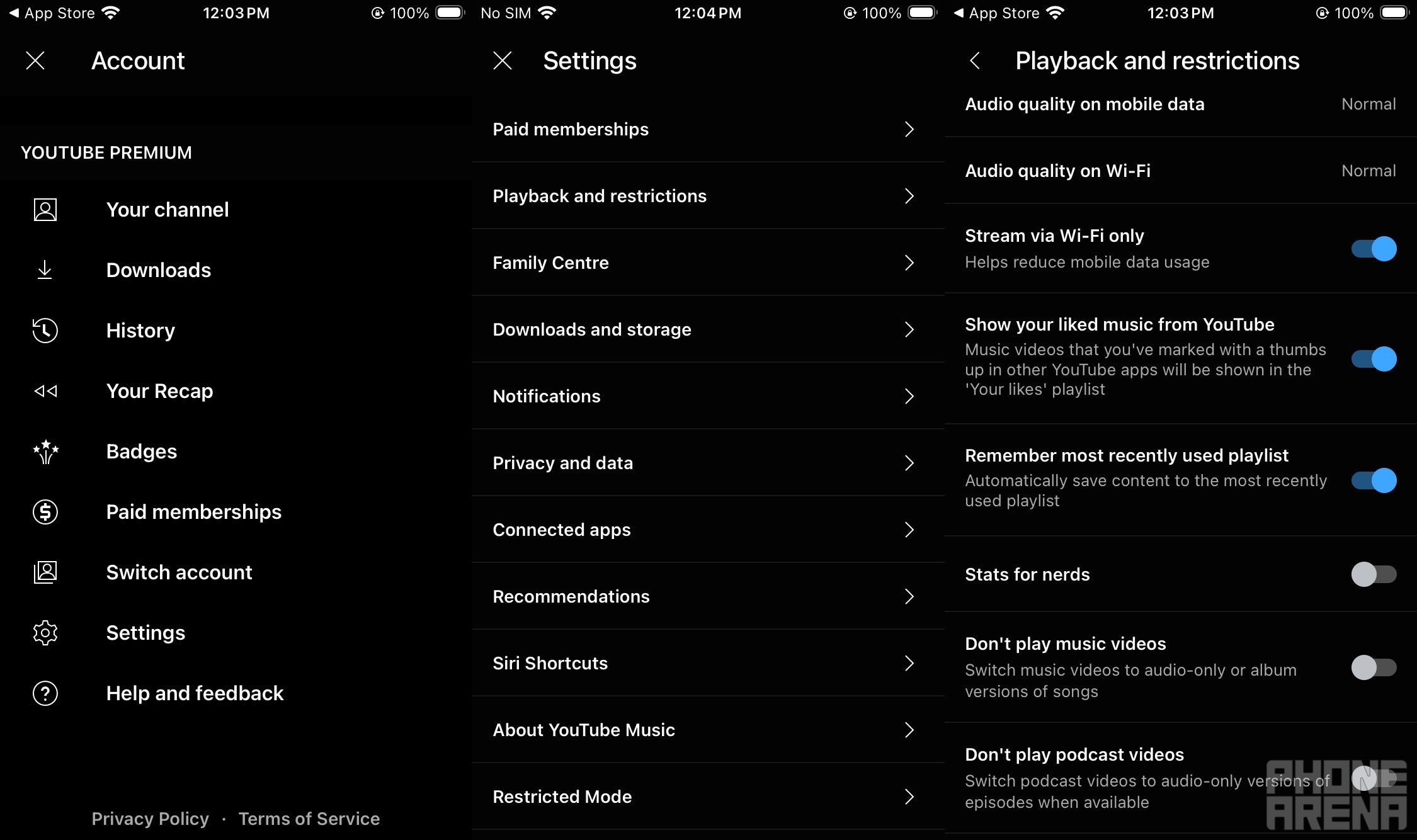
Stream via Wi-Fi only toggle in YouTube Music. | Image by PhoneArena
If the situation persists, you can try a different fix, which has apparently worked for many other affected users as well. According to Redditor iDrinkSaline, all of this is happening because of how queued music is handled.As it turns out, YouTube Music always has a list of recommended songs ready to play next, based on the song you’re currently listening to. For instance, if you play a song directly from the home screen, the music service creates a queue of similar songs. And when you manually switch to a different song or an artist page, it creates its own list of similarly sounding songs. The Redditor believes that these two separate queues get tangled up, causing the autoplay function of YouTube Music to fail. All this is reportedly happening on YouTube’s servers in the cloud, and that is the reason why the problem is not resolved even after clearing the app cache data.
There’s a temporary fix that has apparently resolved the problem for many. Here’s what you need to do:
- Go to the Settings menu of the YouTube Music app, and choose Playback and Restrictions
- Enable the Stream via Wi-Fi only toggle, and close the app completely
- Disable the Wi-Fi on your phone for a few seconds and then enable it again
- Launch the YouTube Music app, and switch between different tracks to check if the problem is gone
Many users mentioned in the comments that this trick worked for them. What this essentially does is stop the music service from trying to load the queue using mobile data. Turning Wi-Fi off and back on forces the app to start fresh, which ultimately clears the queue stuck in the background.
Really looking forward to a permanent solution
It is quite clear from all the reports that I have found online that everything is related to YouTube Music. This becomes even more certain after reading some complaints where users mentioned that the problem does not occur with other apps like SoundCloud.While the above-mentioned trick apparently works, it is still a workaround and not a permanent fix. Google really needs to come up with something permanent, and the possibility of this happening seems high, especially considering that the problem appears to be affecting a good number of users.
