


WindFree Wearable Good Sleep
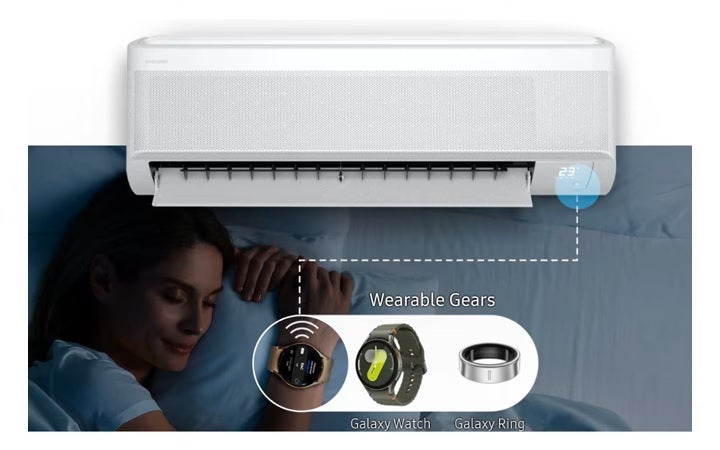
WindFree let’s your Galaxy wearables take care of your sleep | Image by Samsung
The name of the new feature is called “WindFree Wearable Good Sleep” and is supported by the 2026 line of Bespoke AI Samsung devices.
This lineup includes the most recent smart AC units by Samsung, among other appliances. Your Galaxy Watch and Ring can connect to the AC and feed it with real-time data about your body temperature.
The AC then uses this data to keep the room temperature “ideal” during your well-earned sleep. What’s “ideal,” and how is it determined? The answer is science.
Body temperature during sleep cycles
Sicence tells us that our body temperature varies during different sleep cycles. For example, it’s lowest in the morning, right before you wake up, and it changes during the deep sleep phase and earlier in the night, when you’re falling asleep.
According to many scientific papers, colder temperatures make us fall asleep easier. When you’re in a deep sleep phase, a slightly warmer temperature is better for you. Your Galaxy wearable tracks your individual sleep pattern and adjusts the AC accordingly.
Here’s how Samsung explains the feature:
The ‘Good Sleep’ mode fluctuates the indoor temperature over a course of a person’s sleep cycle. Sleep consists of 5 stages – wake, REM (Rapid eye movement), and 3 stages of NREM (Non-rapid eye movement sleep). Each stage of sleep includes variations in brain wave patterns, eye movements, and body temperature. These five stages make up one complete sleep cycle which typically lasts about 90 minutes. Throughout the night, this cycle repeats itself approximately four to six times. The ‘Good Sleep’ cycle adjusts the indoor temperature according to the stage.
You can also check out the full press release here.
How to let your AC take care of the temperature throughout the night
Well, you need one of Samsung’s Bespoke AI WindFree air conditioners, you can find a list of supported devices here. Then you have to install the SmartThings app on your Galaxy Ring or Galaxy Watch, and then connect the AC to the same Wi-Fi network as your phone (and wearables).
You can customize your experience and configure the specific temperature and other variables from the “Sleep well with smart devices” menu on your Galaxy Watch. The feature also requires mobile phones above Galaxy S22, and wearable devices above Galaxy Watch 4 series or Galaxy Ring.
Is this a game changer?
The new feature sounds quite cool and like something taken out of a sci-fi movie. It could prove to be the next step for wearables and make them much more useful. Many people default to just the core functionalities of a smartwatch after the initial honeymoon period ends, and this AC sleep feature could be one that sticks.
Of course, many people like warmer bedrooms (myself included) when falling asleep, no matter if it’s healthy or not, and furthermore, at the moment you need a specific range of AC units that support the feature.
However, I believe that new features like these are getting us closer to the connected home that has been promised years and years ago. And one that’s actually helpful and works.
