


Realme has announced the 10th round of Realme UI 7.0 closed beta recruitment, adding a total of eleven new smartphones to the list. The latest wave includes a couple of Narzo models, P-series phones, and a couple from the number series. We’ve included the complete list below, along with details on how to sign up for the beta program and other important instructions.
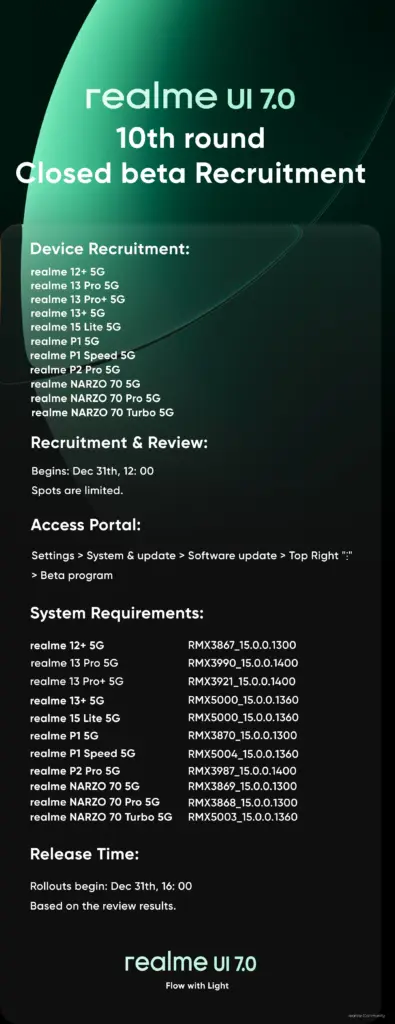
Through a post on the Realme community forum, the company announced the Realme UI 7.0 beta availability for 11 new devices. It reveals the firmware versions that the devices must be running on to participate in the beta program. So, here’s the list of devices along with the required firmware versions:
- Realme 15 Lite 5G – RMX5000_15.0.0.1360
- Realme 13 Pro+ 5G – RMX3921_15.0.0.1400
- Realme 13 Pro 5G – RMX3990_15.0.0.1400
- Realme 13+ 5G – RMX5000_15.0.0.1360
- Realme 12+ 5G – RMX3867_15.0.0.1300
- Realme P2 Pro 5G – RMX3987_15.0.0.1400
- Realme P1 5G – RMX3870_15.0.0.1300
- Realme P1 Speed 5G – RMX5004_15.0.0.1360
- Realme NARZO 70 Turbo 5G – RMX5003_15.0.0.1360
- Realme Narzo 70 Pro 5G – RMX3868_15.0.0.1300
- Realme Narzo 70 5G – RMX3869_15.0.0.1300
The beta applications are already live and will be available until the slots are filled. According to the community post, there are a total of 2,000 applications for each model. So, you must hurry up to grab your spot as these are usually filled up in no time.
How to sign up for the Realme UI 7.0 beta program?
First things first, ensure that your Realme phone is running on the required firmware version. You can check the version details from the About device page. Now, you need to enable the developer settings (if you haven’t already).
To do this, go to Settings > About device > Version > Version number, and then tap the build version seven times in quick succession.
Now, go to Settings > About device > and tap on the Realme UI 7.0 banner at the top. Next, tap the three dots button in the upper-right corner and choose the Beta program. Now, go to Early Access > Apply Now and submit the required details to complete your application.
You may receive the Realme UI 7.0 beta update instantly on your phone as the beta rollout is already live, or in some cases, it may take a few days. Before downloading the update package, ensure that your Realme phone has at least 10GB of storage and 40% battery charge left for a smooth upgrade to Realme UI 7.0.
Please note that this is a beta update, and therefore, some features or apps may not function properly. Realme recommends backing up important data, just in case anything goes wrong during the installation, although it rarely happens.
We’ll keep you updated with the latest news about Realme in our Realme section. You can also join our Telegram channel to get instant news about the latest launches, software updates, and tech breakthroughs.
