

Close Menu

    Subscribe to Updates

    Get the latest creative news from FooBar about art, design and business.

    What's Hot

    Reid Hoffman Wants Silicon Valley to ‘Stand Up’ Against the Trump Administration

    January 13, 2026

    Smartphone Camera Scores Explained: Are DxOMark Rankings Really Reliable?

    January 13, 2026

    Samsung Pushes Galaxy Watch 8 (2025) to Its Lowest Price in New Year Clearance, While Apple Watches Stay Full Price

    January 13, 2026
    Facebook X (Twitter) Instagram
    Wednesday, January 14
    Facebook X (Twitter) Instagram YouTube Mastodon Tumblr Bluesky LinkedIn Threads
    ToolcomeToolcome
    • Technology & Startups

      Reid Hoffman Wants Silicon Valley to ‘Stand Up’ Against the Trump Administration

      January 13, 2026

      Urevo SpaceWalk 5L Walking Pad Review: Compact and Affordable

      January 13, 2026

      Board Review: Tabletop Video Games With Physical Pieces

      January 13, 2026

      Atonemo Streamplayer Review: Make Old Speakers New Again

      January 13, 2026

      What to Do If ICE Invades Your Neighborhood

      January 13, 2026
    • Science & Education

      Hubble Nets Menagerie of Young Stellar Objects

      January 13, 2026

      Ötzi the Iceman mummy carried a high-risk strain of HPV, research finds

      January 13, 2026

      Can you eat too much protein?

      January 13, 2026

      NASA’s Webb Delivers Unprecedented Look Into Heart of Circinus Galaxy

      January 13, 2026

      Backcountry is blowing out hiking bags, backpacks, and luggage for up to 65% off during this clearance sale

      January 13, 2026
    • Mobile Phones

      Smartphone Camera Scores Explained: Are DxOMark Rankings Really Reliable?

      January 13, 2026

      Motorola expands Android 16 beta program to 8 more devices

      January 13, 2026

      Motorola Introduces Moto Pen Ultra for Foldables and Moto Tag 2 Item Tracker

      January 13, 2026

      OnePlus Nord CE 5 Update Adds Video Editing Tools and January Security Patch

      January 13, 2026

      Vivo rolls out OriginOS 6 (Android 16) update to Vivo V40

      January 13, 2026
    • Gadgets

      Star Wars Outlaws developer Massive Entertainment and Ubisoft Stockholm face layoffs

      January 13, 2026

      Insta360 releases AI-powered follow-up to its Link webcams

      January 13, 2026

      Proton’s Lumo AI chatbot now has an encrypted space for your projects

      January 13, 2026

      The best streaming devices for 2026

      January 13, 2026

      UK regulator Ofcom opens a formal investigation into X over CSAM scandal

      January 13, 2026
    • Gaming

      Samsung Pushes Galaxy Watch 8 (2025) to Its Lowest Price in New Year Clearance, While Apple Watches Stay Full Price

      January 13, 2026

      ASUS ROG Xbox Ally (2025 Ryzen Z2 A) Just Hit Its Lowest Price Ever With 3 Months of Game Pass Included

      January 13, 2026

      Samsung Goes All-In on Galaxy S25 Ultra Clearance at a Record Low as the New S26 Launch Approaches

      January 13, 2026

      This Great Switch 2 Handheld Controller Is On Sale For New Best Price At Amazon

      January 13, 2026

      Google Pixel 9a Drops to All-Time Low to Compete With Samsung Galaxy S25 Deals, Now the Cheapest Gemini-Powered Smartphone

      January 13, 2026
    • Cars

      Beyond Speed: A Deep Dive into the 6 Safety Features That Could Save Your Supercar in 2026

      January 13, 2026

      A Commercial Truck Caused a Hit-and-Run: Who Pays for the Damage?

      January 13, 2026

      Risk and reward: what driving teaches about smart decisions

      January 13, 2026

      How It’s Played Online on GameZone

      January 12, 2026

      How Dubai Became the Supercar Capital of the World

      January 12, 2026
    • PC Accessories

      A Kilowatt PSU Is So 2025, The Seasonic Prime PX-2200 Is The Future

      January 12, 2026

      CES 2026: The Good, Bad And Ugly

      January 12, 2026

      Hands-On With Samsung Galaxy Z TriFold: An Impressive New Take On Foldables

      January 11, 2026

      Edifier’s Funky Portable ES300 Wireless Speaker

      January 9, 2026

      Testing All The Features of AMD’s FSR Redstone

      January 9, 2026
    ToolcomeToolcome
    Home»Mobile Phones»Safari on iOS 26 is a mess, but you can fix some of it
    Mobile Phones

    Safari on iOS 26 is a mess, but you can fix some of it

    November 4, 2025No Comments6 Mins Read3 Views
    Facebook Twitter Pinterest LinkedIn Telegram Tumblr Email
    Share
    Facebook Twitter LinkedIn Pinterest Email


    The iPhones’ iOS 26 was a thrilling update, awaited with anticipation for its new Liquid Glass look and general redesign and modernization. It hasn’t been smooth sailing, as the translucent elements took some getting used to, and it did launch with some beta-level visual bugs, but Apple is slowly ironing them out.But one thing I did not expect out of the entire update was a Safari UI that feels like a step backwards.

    Apple loves minimal design, and took the opportunity to minimize the controls within its default browser app even further. The result is a default view that has many users, myself included, frustrated.

    The Compact view
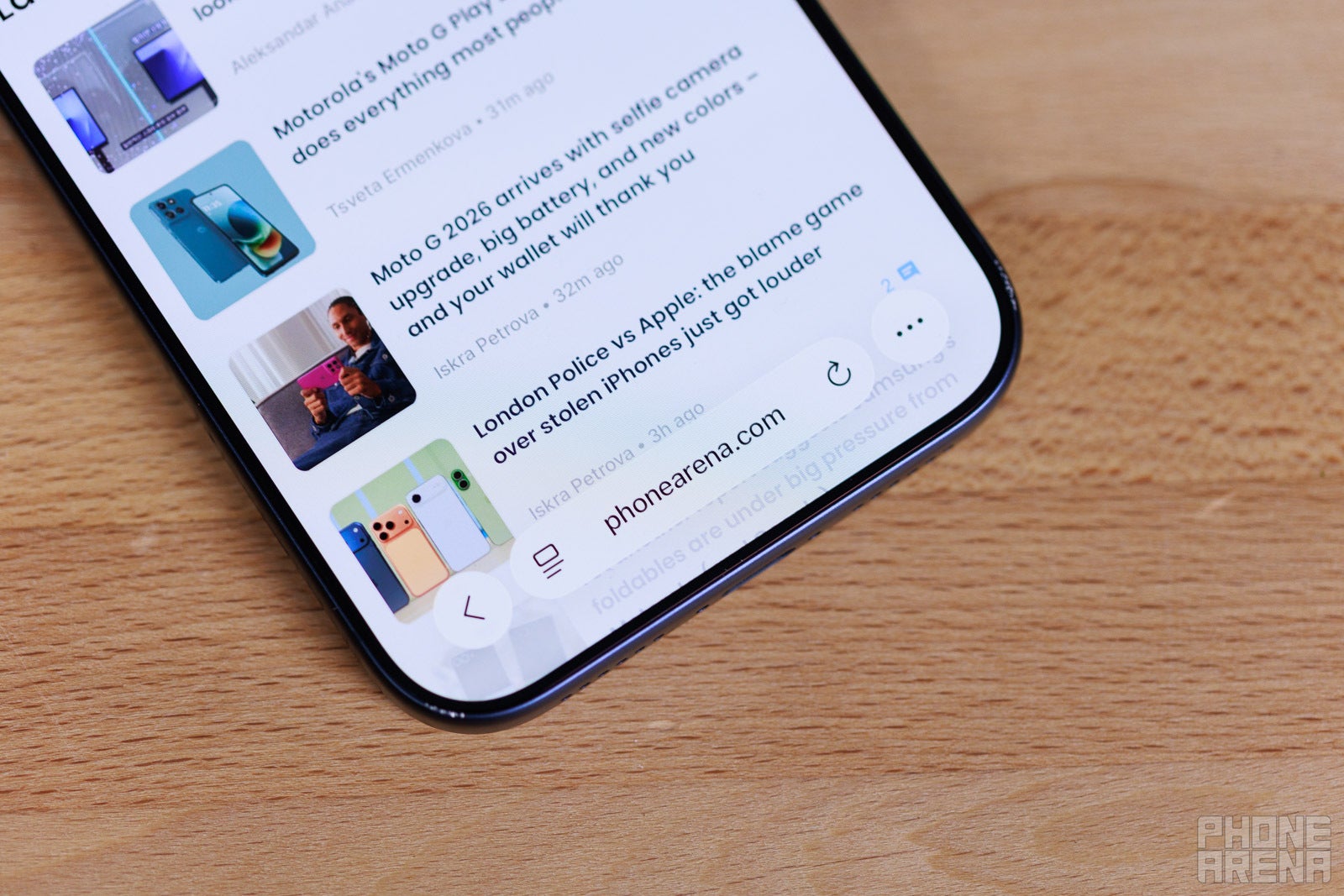
    So minimalistic! (Image credit - PhoneArena) - Safari on iOS 26 is a mess, but you can fix some of itSo minimalistic! (Image credit - PhoneArena) - Safari on iOS 26 is a mess, but you can fix some of it

    So minimalistic! (Image credit – PhoneArena)

    When you first open Safari in iOS 26, it looks new and fresh. Its controls are situated in a few droplets of “Liquid Glass” at the very bottom. However, once you start using it, it feels like a browser that hasn’t been made for people that like to use multiple tabs.
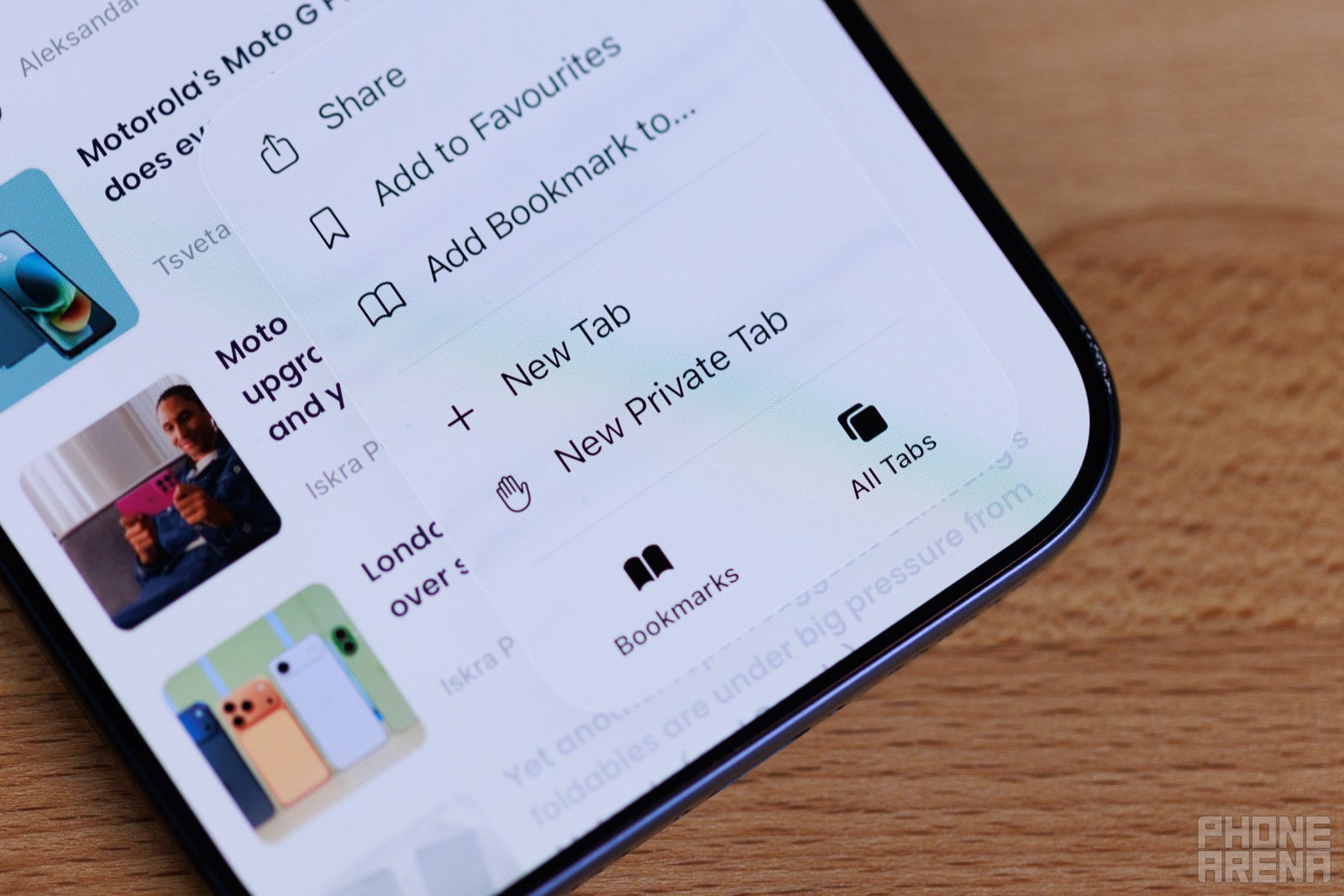
    Tap once to find All Tabs (Image credit - PhoneArena) - Safari on iOS 26 is a mess, but you can fix some of itTap once to find All Tabs (Image credit - PhoneArena) - Safari on iOS 26 is a mess, but you can fix some of it

    Tap once to find All Tabs (Image credit – PhoneArena)

    The “All tabs” button is now hidden behind the “…” button at the bottom right. Thus, accessing them takes an extra tap, which is frustrating since this is the first time in the history of iOS, since inception, that it actually hides All Tabs behind a menu button.

    The issue is further compounded by the fact that, by default, if you hold on a link and choose “Open in New Tab”, said tab will immediately open on screen. Returning to what you were previously viewing requires too many taps now.

    Apple thinks gestures can make up for this?

    Safari has pretty intuitive gestures when you swipe from the address bar, which is situated on the bottom now. If you “grab” the bar and swipe up, you enter the “All tabs” menu. If you swipe horizontally over the address bar, left or right, you instantly swap to previous or next tabs.
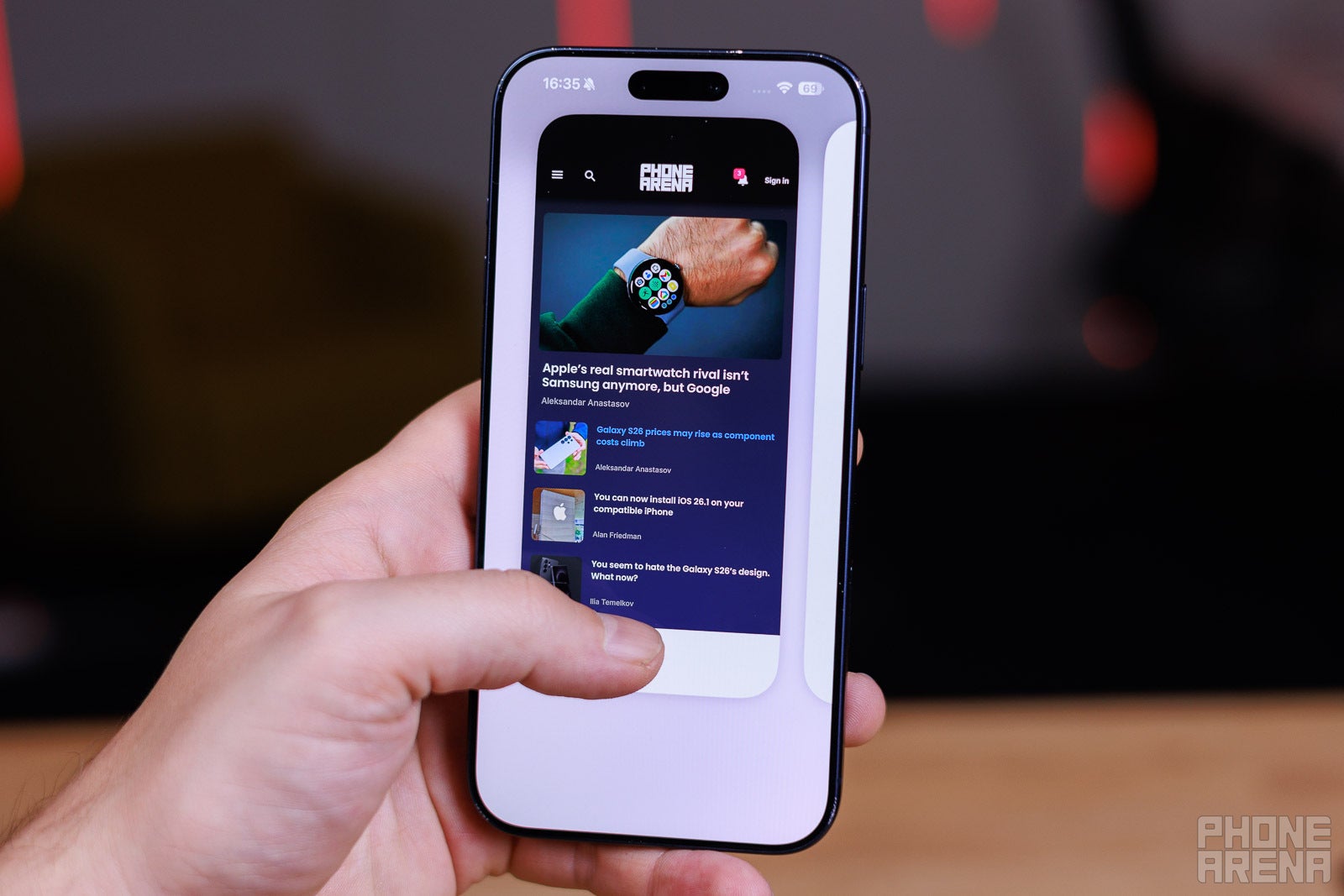
    Flick up to browse all tabs, careful not to flick the Nav bar instead! (Image credit - PhoneArena) - Safari on iOS 26 is a mess, but you can fix some of itFlick up to browse all tabs, careful not to flick the Nav bar instead! (Image credit - PhoneArena) - Safari on iOS 26 is a mess, but you can fix some of it

    Flick up to browse all tabs, careful not to flick the Nav bar instead! (Image credit – PhoneArena)

    This is very convenient and cool, I agree. The problem is that, just below the address bar, there’s the iOS navigation bar. And sometimes, I accidentally swipe up from the navigation bar and minimize Safari. Or, sometimes I swipe horizontally over the navigation bar and switch apps instead of switching tabs.

    Needless to say, I wince every time I choose to use Safari gestures, and ultimately prefer not to.

    No clear feedback

    The Back button’s inconsistency is also extra frustrating. By default, it’s just a left-pointing arrow for back. However, it’s contextual — if you do tap “Back” once, it expands to feature two buttons — back and forward.

    By itself, that’s an annoyance for anyone who likes the interface to be constant and consistent. But then, there’s also the slightly irritating UI feedback when tapping on either arrow. You never see a clear indication of which button you tapped. When you press “forward”, for example, the entire Liquid Glass droplet that houses both buttons jumps up, with no “weight” to it to show you which side you pressed.
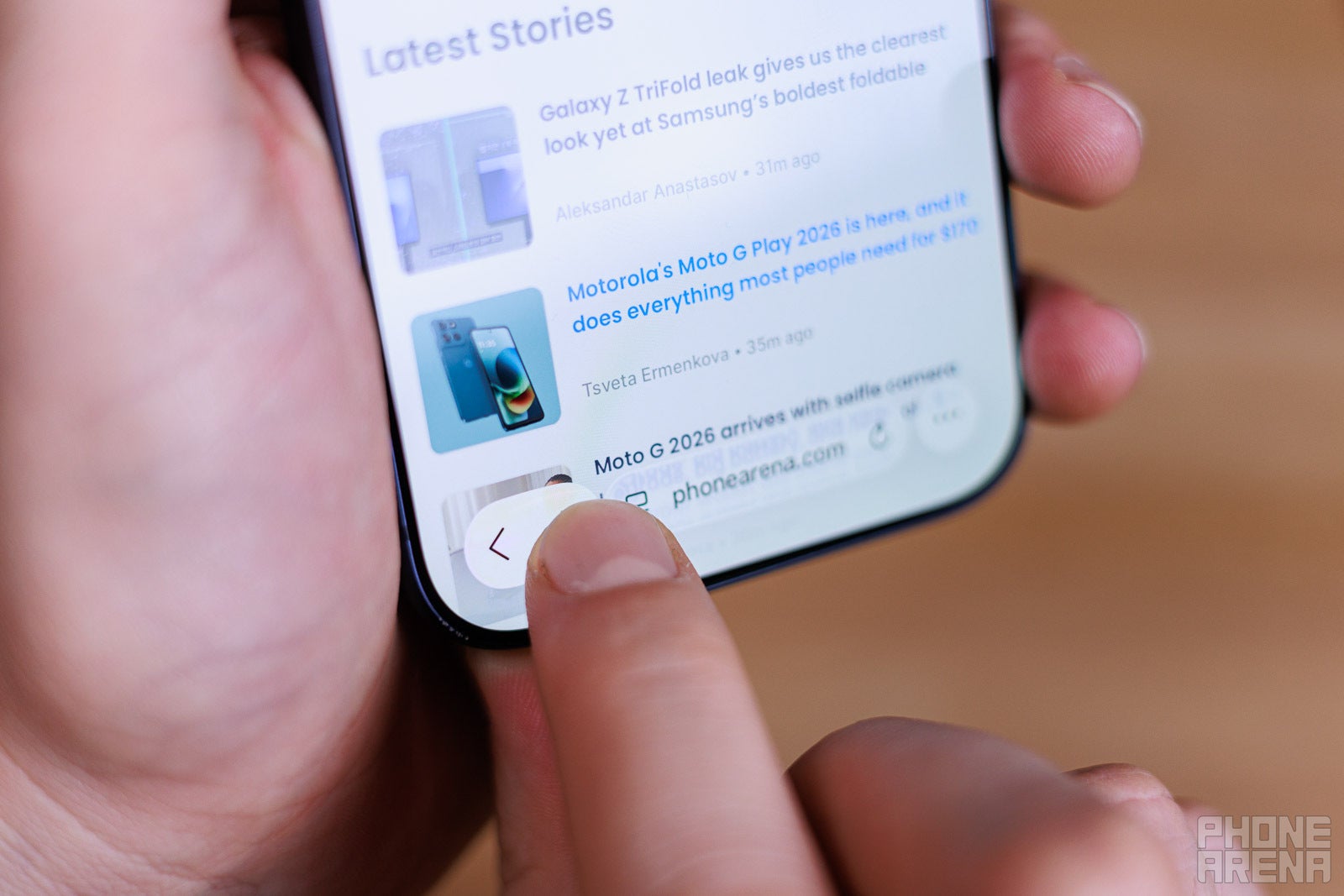
    Did I tap Forward or did I tap Back? Guess! (Image credit - PhoneArena) - Safari on iOS 26 is a mess, but you can fix some of itDid I tap Forward or did I tap Back? Guess! (Image credit - PhoneArena) - Safari on iOS 26 is a mess, but you can fix some of it

    Did I tap Forward or did I tap Back? Guess! (Image credit – PhoneArena)

    This is a bigger issue with drop-down or multiple choice menus. You get one big Liguid Glass panel with all the options you have to tap on. No separators between them or anything. When you tap something, you get no indication of where your finger landed — you just hope you were accurate until Safari loads up whatever it was you were going for.

    You can fix some of this in Settings

    Thankfully, Safari does allow for some customization within Settings. Just go to Apps -> Safari and scroll down for the Tabs options.

    If you were used to the way iOS 18 had the address bar and all navigational buttons at the bottom of the screen, switch to the Bottom option. Though that does add a huge chunk of interface at the lower end of the screen.

    The classic look with the address bar on top and nav bar on the bottom seems the most balanced to me — choose the Top option to try it out.
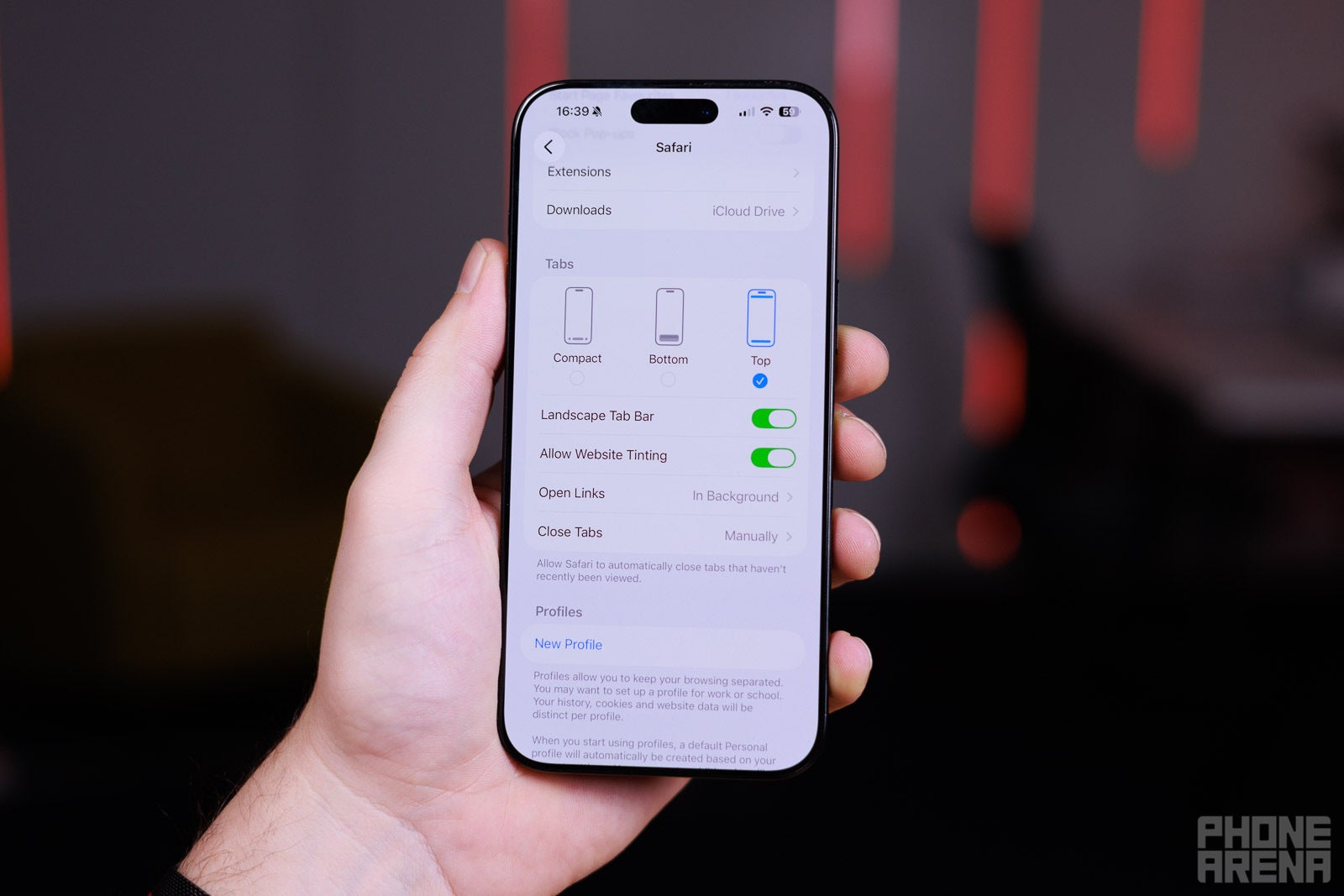
    For classic boomer controls, choose Top (Image credit - PhoneArena) - Safari on iOS 26 is a mess, but you can fix some of itFor classic boomer controls, choose Top (Image credit - PhoneArena) - Safari on iOS 26 is a mess, but you can fix some of it

    For classic boomer controls, choose Top (Image credit – PhoneArena)

    While you are here, go to the Open Links menu and choose “In Background”. This will stop Safari from constantly changing what you are looking at every time you decide to open a link in a new tab. By definition, we do that because we are not done with our current tab, yes?

    Speaking of fixes — if you’ve been annoyed by how some of Safari’s translucent elements become hard to see, depending on the website content behind them, you should download iOS 26.1. Now, there’s an option where Liquid Glass can be a bit more tinted and opaque, making things across the entire interface a bit more legible. Though, it will lose some of that shiny luster.

    In general, it was a step in the wrong direction

    It’s wild that, in 2025, Safari doesn’t give us a “New tab” button at the very face of the interface. If you look at Google Chrome on mobile, you will see the “+” button right next to your address bar — because it makes sense, and every other operating system has it there. iPadOS, macOS, Windows, Android — no matter what you are using, you have been “taught” that New Tab is just a click away!But OK, let’s say the minimalist approach has some appeal to it. Safari is meant to have a “swipe-first” type of interface, and it’s a legitimate way of implementing it, considering the way we interact with smartphones. For example, if you are swiping on the address bar to swap between tabs, swiping all the way to the right will always open a new tab, and apparently that’s how you are meant to do it.

    Still, it doesn’t make sense that in iOS 26’s Safari, the “All Tabs” button is in the bottom-right corner of the screen, but after you access it, the “New Tab” button is in the bottom left. It’s a very “Un-Apple” thing that the interface element for “New Tab” is on the left side when tapping, but to swipe to a new tab, you have to go to the right-most side.

    And, if you are old school, and you want to tap your way to “New Tab”, it requires two to three taps to do so, and said taps are located on the opposite ends of the screen. Almost as if Apple makes sure you are not going to open a new tab… by mistake? Is that a fatal error I should be worried about?

    Also, I think it’s silly that “Open in New Tab” doesn’t put that new tab in the background by default. As stated before — this is the very reason we choose this option in the first place.

    Do you use Safari on your iPhone, or have you been tempted to switch to Chrome, Opera, or something else as a default go-to browser?

    Read the latest from Preslav Kateliev

    Share. Facebook Twitter Pinterest LinkedIn Tumblr Email
    mehedihasan9992
    • Website

    Related Posts

    Smartphone Camera Scores Explained: Are DxOMark Rankings Really Reliable?

    January 13, 2026

    Motorola expands Android 16 beta program to 8 more devices

    January 13, 2026

    Motorola Introduces Moto Pen Ultra for Foldables and Moto Tag 2 Item Tracker

    January 13, 2026

    OnePlus Nord CE 5 Update Adds Video Editing Tools and January Security Patch

    January 13, 2026

    Vivo rolls out OriginOS 6 (Android 16) update to Vivo V40

    January 13, 2026

    Alienware Launches New Area-51 Gaming Laptops With RTX 5090, 240Hz OLED Displays, and Cryo-Chamber Cooling

    January 13, 2026
    Leave A Reply Cancel Reply

    Top Posts

    Steam and Valve’s online games are down

    December 24, 2025129 Views

    773,000-year-old fossils found in Casablanca may be earliest common ancestor of modern humans and Neanderthals

    January 8, 202695 Views

    Get three months of Apple Music for only $1 right now

    December 5, 202542 Views
    Don't Miss

    Reid Hoffman Wants Silicon Valley to ‘Stand Up’ Against the Trump Administration

    January 13, 2026

    Reid Hoffman doesn’t do much in half measures. He cofounded LinkedIn, of course, and helped…

    Smartphone Camera Scores Explained: Are DxOMark Rankings Really Reliable?

    January 13, 2026

    Samsung Pushes Galaxy Watch 8 (2025) to Its Lowest Price in New Year Clearance, While Apple Watches Stay Full Price

    January 13, 2026

    Hubble Nets Menagerie of Young Stellar Objects

    January 13, 2026
    Stay In Touch
    • Facebook
    • YouTube
    • TikTok
    • WhatsApp
    • Twitter
    • Instagram
    Latest Reviews
    8.9

    Review: Dell’s New Tablet PC Can Survive -20f And Drops

    January 15, 2021

    Review: Kia EV6 2022 The Best Electric Vehicle Ever?

    January 14, 2021
    72

    Review: Animation Software Business Share, Market Size and Growth

    January 14, 2021
    Most Popular

    Steam and Valve’s online games are down

    December 24, 2025129 Views

    773,000-year-old fossils found in Casablanca may be earliest common ancestor of modern humans and Neanderthals

    January 8, 202695 Views

    Get three months of Apple Music for only $1 right now

    December 5, 202542 Views
    Our Picks

    Reid Hoffman Wants Silicon Valley to ‘Stand Up’ Against the Trump Administration

    January 13, 2026

    Smartphone Camera Scores Explained: Are DxOMark Rankings Really Reliable?

    January 13, 2026

    Samsung Pushes Galaxy Watch 8 (2025) to Its Lowest Price in New Year Clearance, While Apple Watches Stay Full Price

    January 13, 2026

    Subscribe to Updates

    Get the latest creative news from FooBar about art, design and business.

    Toolcome
    Facebook X (Twitter) Instagram YouTube Mastodon Bluesky
    • Home
    • Technology
    • Gaming
    • Mobile Phones
    • Cars
    • PC Accessories
    © 2026 Tolcome.

    Type above and press Enter to search. Press Esc to cancel.