

Close Menu

    Subscribe to Updates

    Get the latest creative news from FooBar about art, design and business.

    What's Hot

    Reid Hoffman Wants Silicon Valley to ‘Stand Up’ Against the Trump Administration

    January 13, 2026

    Smartphone Camera Scores Explained: Are DxOMark Rankings Really Reliable?

    January 13, 2026

    Samsung Pushes Galaxy Watch 8 (2025) to Its Lowest Price in New Year Clearance, While Apple Watches Stay Full Price

    January 13, 2026
    Facebook X (Twitter) Instagram
    Wednesday, January 14
    Facebook X (Twitter) Instagram YouTube Mastodon Tumblr Bluesky LinkedIn Threads
    ToolcomeToolcome
    • Technology & Startups

      Reid Hoffman Wants Silicon Valley to ‘Stand Up’ Against the Trump Administration

      January 13, 2026

      Urevo SpaceWalk 5L Walking Pad Review: Compact and Affordable

      January 13, 2026

      Board Review: Tabletop Video Games With Physical Pieces

      January 13, 2026

      Atonemo Streamplayer Review: Make Old Speakers New Again

      January 13, 2026

      What to Do If ICE Invades Your Neighborhood

      January 13, 2026
    • Science & Education

      Hubble Nets Menagerie of Young Stellar Objects

      January 13, 2026

      Ötzi the Iceman mummy carried a high-risk strain of HPV, research finds

      January 13, 2026

      Can you eat too much protein?

      January 13, 2026

      NASA’s Webb Delivers Unprecedented Look Into Heart of Circinus Galaxy

      January 13, 2026

      Backcountry is blowing out hiking bags, backpacks, and luggage for up to 65% off during this clearance sale

      January 13, 2026
    • Mobile Phones

      Smartphone Camera Scores Explained: Are DxOMark Rankings Really Reliable?

      January 13, 2026

      Motorola expands Android 16 beta program to 8 more devices

      January 13, 2026

      Motorola Introduces Moto Pen Ultra for Foldables and Moto Tag 2 Item Tracker

      January 13, 2026

      OnePlus Nord CE 5 Update Adds Video Editing Tools and January Security Patch

      January 13, 2026

      Vivo rolls out OriginOS 6 (Android 16) update to Vivo V40

      January 13, 2026
    • Gadgets

      Star Wars Outlaws developer Massive Entertainment and Ubisoft Stockholm face layoffs

      January 13, 2026

      Insta360 releases AI-powered follow-up to its Link webcams

      January 13, 2026

      Proton’s Lumo AI chatbot now has an encrypted space for your projects

      January 13, 2026

      The best streaming devices for 2026

      January 13, 2026

      UK regulator Ofcom opens a formal investigation into X over CSAM scandal

      January 13, 2026
    • Gaming

      Samsung Pushes Galaxy Watch 8 (2025) to Its Lowest Price in New Year Clearance, While Apple Watches Stay Full Price

      January 13, 2026

      ASUS ROG Xbox Ally (2025 Ryzen Z2 A) Just Hit Its Lowest Price Ever With 3 Months of Game Pass Included

      January 13, 2026

      Samsung Goes All-In on Galaxy S25 Ultra Clearance at a Record Low as the New S26 Launch Approaches

      January 13, 2026

      This Great Switch 2 Handheld Controller Is On Sale For New Best Price At Amazon

      January 13, 2026

      Google Pixel 9a Drops to All-Time Low to Compete With Samsung Galaxy S25 Deals, Now the Cheapest Gemini-Powered Smartphone

      January 13, 2026
    • Cars

      Beyond Speed: A Deep Dive into the 6 Safety Features That Could Save Your Supercar in 2026

      January 13, 2026

      A Commercial Truck Caused a Hit-and-Run: Who Pays for the Damage?

      January 13, 2026

      Risk and reward: what driving teaches about smart decisions

      January 13, 2026

      How It’s Played Online on GameZone

      January 12, 2026

      How Dubai Became the Supercar Capital of the World

      January 12, 2026
    • PC Accessories

      A Kilowatt PSU Is So 2025, The Seasonic Prime PX-2200 Is The Future

      January 12, 2026

      CES 2026: The Good, Bad And Ugly

      January 12, 2026

      Hands-On With Samsung Galaxy Z TriFold: An Impressive New Take On Foldables

      January 11, 2026

      Edifier’s Funky Portable ES300 Wireless Speaker

      January 9, 2026

      Testing All The Features of AMD’s FSR Redstone

      January 9, 2026
    ToolcomeToolcome
    Home»Gadgets»The Logitech MX Master 4 comes with haptic feedback, less rubber and the same general shape
    Gadgets

    The Logitech MX Master 4 comes with haptic feedback, less rubber and the same general shape

    November 11, 2025No Comments7 Mins Read0 Views
    Facebook Twitter Pinterest LinkedIn Telegram Tumblr Email
    Share
    Facebook Twitter LinkedIn Pinterest Email


    Editor’s note (11/10/25): After spending another month with the MX Master 4, our impressions remain largely unchanged. The new textured plastic finish and silicone thumb rest have shown no signs of wear, and we’ve continued to see no erratic behavior with the electromagnetic scroll wheel. Battery life still lines up with Logitech’s rating, while the haptic feedback and Actions Ring functionality remain useful if inessential. We’ve added an official review score to this post as a result. Our original hands-on is below.

    Original post (9/30/25): If you’ve shopped around for a wireless mouse at any point in the past decade, you’ve probably seen lots of people recommending a Logitech MX Master. There’s good reason for that: They aren’t cheap, but they’re usually comfortable, versatile and loaded with features designed to make working in front of a monitor all day a little less annoying. The current MX Master 3S has sat at the top of our own wireless mouse buying guide for some time now.

    Now, three years after releasing the 3S, Logitech is rolling out the new MX Master 4, which costs $120 and will ship in October. I’ve been able to test it out for the past few weeks.

    Image for the large product module

    Logitech

    While not a major overhaul, the MX Master 4 refines an already great productivity mouse with a sturdier finish, nifty haptic feedback and other subtle upgrades.

    Pros

    • Supremely comfortable for medium and large hands
    • Tactile, near-silent click buttons
    • High-quality, versatile scroll wheels
    • More durable finish
    • Pleasing (if gimmicky) haptic feedback
    • Tons of software features
    Cons

    • Not for lefties or small hands
    • Bare minimum polling rate
    • No onboard memory
    • No storage compartment for USB receiver
    • On the pricier side

    $120 at Amazon

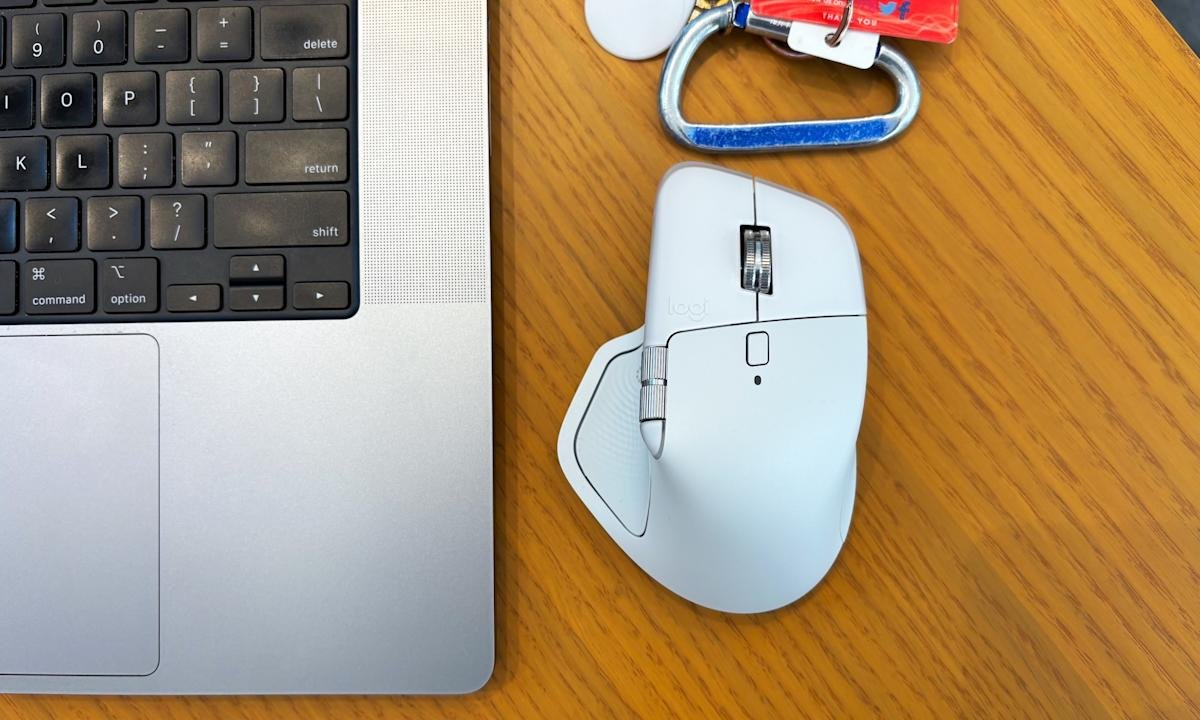
    For the most part, this is an iterative update, with the same general shape, battery life, 8K DPI sensor and ultra-quiet clicks as the MX Master 3S before it. It is a touch heavier (150 grams vs. 141g), wider (3.48 inches vs 3.32 in.) and taller (5.05 inches vs. 4.92 in.) than the last model, and the main click buttons are slightly larger. But if you found the 3S or older MX Master 3 comfortable, you should have few issues here. That said, this is still a hefty mouse designed for palm grippers and right-handed users: Its gentle contours, generous hump, ample thumb rest and large buttons will fit like a glove if that describes you, but lefties and those with especially petite hands won’t agree.

    The flashiest change here is the addition of haptic feedback, which is built into a small panel within the mouse’s thumb rest. You can customize the intensity of this effect through Logitech’s Options+ software — or turn it off entirely — but it essentially brings a modicum of smartphone-style feedback to your desktop. When you first pair the mouse, for one, you’ll feel a little bump. The same goes if you move between devices using Logitech’s “Flow” feature. When battery is low, it’ll vibrate. If you’re trying to precisely line up a graphic in an app like Photoshop, you’ll get a little buzz when you’ve moved it to the exact right spot.

    The side profile of the Logitech MX Master 4, showcasing the new Actions Ring button and haptic feedback panel built into the mouse's large thumb rest.

    Jeff Dunn for Engadget

    You’ll also feel it when you hover over options in the Actions Ring, a customizable overlay that presents different shortcuts depending on the app you’re using. This pops up when you click the side panel; you could use it quickly access the screenshot tool while in Chrome, for instance, or the brightness and contrast sliders in Photoshop.

    If all of this sounds like a gimmick, well, yeah it kind of is. It’s not the kind of thing anyone needs. But the effect is surprisingly subtle on the default “medium” setting, and there’s a level of reassurance that comes with feeling a confirmed action instead of just seeing it. I found it more pleasant than distracting. The catch is that only a few apps will natively support the MX Master 4’s haptics at launch: Photoshop, Lightroom and Zoom, with Adobe Premiere Pro to follow soon after. You’ll still be able to utilize the haptic feedback on a system level on Windows and macOS, and Logitech is releasing an SDK for more developers to integrate the functionality, but we’ll have to see how many do so.

    Another change is with the mouse’s coating, which trades the 3S’ rubbery finish for a lightly textured plastic around the top. (The thumb rest area and right side still use a denser rubber.) Some users have complained about older MX Master mice peeling and wearing down after extended use; time will tell how well the new model holds up, but it should avoid the same sort of sweat-induced degradation. Either way, I’ve found it smooth to the touch without being slippery. I also haven’t been able to replicate the accuracy issues some 3S buyers have had with that mouse’s electromagnetic scroll wheel, which is still made of a high-quality metal and lets you conveniently swap between a notched and free-spin scroll on the fly.

    A screenshot of the Logi Options+ app showcasing how you can customize the Actions Ring function built into the Logitech MX Master 4 wireless mouse.

    Customizing the Actions Ring in Logitech’s Options+ app. (Logitech/Jeff Dunn for Engadget)

    There are other minor tweaks and improvements. The receiver included with the Windows model is now USB-C instead of USB-A. The horizontal scroll wheel on the side — which remains a blessing for navigating spreadsheets — is now more exposed and extends a little farther with each spin. The PTFE feet on the bottom are a bit larger for a smoother glide. The dedicated gesture button is no longer awkwardly integrated into the thumb rest; instead, it’s been pulled out ahead of the two programmable side buttons. Logitech says there’s a more powerful chip inside the mouse to improve connection quality. The edges around the main click buttons are now translucent: nothing major, but a bit more stylish. The screws on the bottom are now exposed, too, which Logitech says should be helpful for recycling purposes down the road.

    The rest is largely the same as before, which isn’t a bad thing. The best feature here is still the virtually silent main buttons, which keep a pleasing level of travel but will never bother anyone around you. Battery life is still rated at a solid 70 days, which seems about right — I haven’t charged the mouse in about a month and the Options+ app says I still have about 50 percent juice left. The design still feels super sturdy, with no flexing or creaking. The side buttons feel firm and tactile. Options+ is resource-heavy but still intuitive enough for reprogramming buttons and customizing app-specific settings. It can still track on a variety of surfaces, including glass or the fabric of my couch. You can still connect to three devices simultaneously and switch between them with a button on the bottom, too.

    A man uses a graphite Logitech MX Master 4 wireless mouse on a white glossy desk.

    Logitech

    On the downside, there’s no USB-C cable included in the box anymore, and the polling rate is still set at a basic 125Hz, which means tracking isn’t quite as buttery smooth as it could be. (Though you’d never want to use something this heavy for gaming.) The Mac version doesn’t come with a USB receiver, and there’s still no built-in storage compartment for the dongle with either model. You also need to keep Options+ open to feel the haptic feedback, which is annoying, especially if your work limits use of third-party software.

    Some of those complaints have been issues for a while, so it’s frustrating to see them three years later. Still, they’re probably not dealbreakers. The MX Master 4 may not be a essential upgrade if you’re happy with an older MX Master mouse, and if those didn’t work for you before, this one probably won’t work for you now. But if you’re a power user in the market for a new productivity mouse, we’d expect this newest iteration to be as popular as its predecessors.

    Share. Facebook Twitter Pinterest LinkedIn Tumblr Email
    mehedihasan9992
    • Website

    Related Posts

    Star Wars Outlaws developer Massive Entertainment and Ubisoft Stockholm face layoffs

    January 13, 2026

    Insta360 releases AI-powered follow-up to its Link webcams

    January 13, 2026

    Proton’s Lumo AI chatbot now has an encrypted space for your projects

    January 13, 2026

    The best streaming devices for 2026

    January 13, 2026

    UK regulator Ofcom opens a formal investigation into X over CSAM scandal

    January 13, 2026

    This ElevationLabs 10-year extended battery case for AirTags is on sale for only $16

    January 13, 2026
    Leave A Reply Cancel Reply

    Top Posts

    Steam and Valve’s online games are down

    December 24, 2025129 Views

    773,000-year-old fossils found in Casablanca may be earliest common ancestor of modern humans and Neanderthals

    January 8, 202696 Views

    Get three months of Apple Music for only $1 right now

    December 5, 202542 Views
    Don't Miss

    Reid Hoffman Wants Silicon Valley to ‘Stand Up’ Against the Trump Administration

    January 13, 2026

    Reid Hoffman doesn’t do much in half measures. He cofounded LinkedIn, of course, and helped…

    Smartphone Camera Scores Explained: Are DxOMark Rankings Really Reliable?

    January 13, 2026

    Samsung Pushes Galaxy Watch 8 (2025) to Its Lowest Price in New Year Clearance, While Apple Watches Stay Full Price

    January 13, 2026

    Hubble Nets Menagerie of Young Stellar Objects

    January 13, 2026
    Stay In Touch
    • Facebook
    • YouTube
    • TikTok
    • WhatsApp
    • Twitter
    • Instagram
    Latest Reviews
    8.9

    Review: Dell’s New Tablet PC Can Survive -20f And Drops

    January 15, 2021

    Review: Kia EV6 2022 The Best Electric Vehicle Ever?

    January 14, 2021
    72

    Review: Animation Software Business Share, Market Size and Growth

    January 14, 2021
    Most Popular

    Steam and Valve’s online games are down

    December 24, 2025129 Views

    773,000-year-old fossils found in Casablanca may be earliest common ancestor of modern humans and Neanderthals

    January 8, 202696 Views

    Get three months of Apple Music for only $1 right now

    December 5, 202542 Views
    Our Picks

    Reid Hoffman Wants Silicon Valley to ‘Stand Up’ Against the Trump Administration

    January 13, 2026

    Smartphone Camera Scores Explained: Are DxOMark Rankings Really Reliable?

    January 13, 2026

    Samsung Pushes Galaxy Watch 8 (2025) to Its Lowest Price in New Year Clearance, While Apple Watches Stay Full Price

    January 13, 2026

    Subscribe to Updates

    Get the latest creative news from FooBar about art, design and business.

    Toolcome
    Facebook X (Twitter) Instagram YouTube Mastodon Bluesky
    • Home
    • Technology
    • Gaming
    • Mobile Phones
    • Cars
    • PC Accessories
    © 2026 Tolcome.

    Type above and press Enter to search. Press Esc to cancel.