

Close Menu

    Subscribe to Updates

    Get the latest creative news from FooBar about art, design and business.

    What's Hot

    Reid Hoffman Wants Silicon Valley to ‘Stand Up’ Against the Trump Administration

    January 13, 2026

    Smartphone Camera Scores Explained: Are DxOMark Rankings Really Reliable?

    January 13, 2026

    Samsung Pushes Galaxy Watch 8 (2025) to Its Lowest Price in New Year Clearance, While Apple Watches Stay Full Price

    January 13, 2026
    Facebook X (Twitter) Instagram
    Wednesday, January 14
    Facebook X (Twitter) Instagram YouTube Mastodon Tumblr Bluesky LinkedIn Threads
    ToolcomeToolcome
    • Technology & Startups

      Reid Hoffman Wants Silicon Valley to ‘Stand Up’ Against the Trump Administration

      January 13, 2026

      Urevo SpaceWalk 5L Walking Pad Review: Compact and Affordable

      January 13, 2026

      Board Review: Tabletop Video Games With Physical Pieces

      January 13, 2026

      Atonemo Streamplayer Review: Make Old Speakers New Again

      January 13, 2026

      What to Do If ICE Invades Your Neighborhood

      January 13, 2026
    • Science & Education

      Hubble Nets Menagerie of Young Stellar Objects

      January 13, 2026

      Ötzi the Iceman mummy carried a high-risk strain of HPV, research finds

      January 13, 2026

      Can you eat too much protein?

      January 13, 2026

      NASA’s Webb Delivers Unprecedented Look Into Heart of Circinus Galaxy

      January 13, 2026

      Backcountry is blowing out hiking bags, backpacks, and luggage for up to 65% off during this clearance sale

      January 13, 2026
    • Mobile Phones

      Smartphone Camera Scores Explained: Are DxOMark Rankings Really Reliable?

      January 13, 2026

      Motorola expands Android 16 beta program to 8 more devices

      January 13, 2026

      Motorola Introduces Moto Pen Ultra for Foldables and Moto Tag 2 Item Tracker

      January 13, 2026

      OnePlus Nord CE 5 Update Adds Video Editing Tools and January Security Patch

      January 13, 2026

      Vivo rolls out OriginOS 6 (Android 16) update to Vivo V40

      January 13, 2026
    • Gadgets

      Star Wars Outlaws developer Massive Entertainment and Ubisoft Stockholm face layoffs

      January 13, 2026

      Insta360 releases AI-powered follow-up to its Link webcams

      January 13, 2026

      Proton’s Lumo AI chatbot now has an encrypted space for your projects

      January 13, 2026

      The best streaming devices for 2026

      January 13, 2026

      UK regulator Ofcom opens a formal investigation into X over CSAM scandal

      January 13, 2026
    • Gaming

      Samsung Pushes Galaxy Watch 8 (2025) to Its Lowest Price in New Year Clearance, While Apple Watches Stay Full Price

      January 13, 2026

      ASUS ROG Xbox Ally (2025 Ryzen Z2 A) Just Hit Its Lowest Price Ever With 3 Months of Game Pass Included

      January 13, 2026

      Samsung Goes All-In on Galaxy S25 Ultra Clearance at a Record Low as the New S26 Launch Approaches

      January 13, 2026

      This Great Switch 2 Handheld Controller Is On Sale For New Best Price At Amazon

      January 13, 2026

      Google Pixel 9a Drops to All-Time Low to Compete With Samsung Galaxy S25 Deals, Now the Cheapest Gemini-Powered Smartphone

      January 13, 2026
    • Cars

      Beyond Speed: A Deep Dive into the 6 Safety Features That Could Save Your Supercar in 2026

      January 13, 2026

      A Commercial Truck Caused a Hit-and-Run: Who Pays for the Damage?

      January 13, 2026

      Risk and reward: what driving teaches about smart decisions

      January 13, 2026

      How It’s Played Online on GameZone

      January 12, 2026

      How Dubai Became the Supercar Capital of the World

      January 12, 2026
    • PC Accessories

      A Kilowatt PSU Is So 2025, The Seasonic Prime PX-2200 Is The Future

      January 12, 2026

      CES 2026: The Good, Bad And Ugly

      January 12, 2026

      Hands-On With Samsung Galaxy Z TriFold: An Impressive New Take On Foldables

      January 11, 2026

      Edifier’s Funky Portable ES300 Wireless Speaker

      January 9, 2026

      Testing All The Features of AMD’s FSR Redstone

      January 9, 2026
    ToolcomeToolcome
    Home»Gadgets»How to stretch the clock on your lock screen in iOS 26
    Gadgets

    How to stretch the clock on your lock screen in iOS 26

    November 10, 2025No Comments6 Mins Read0 Views
    Facebook Twitter Pinterest LinkedIn Telegram Tumblr Email
    Share
    Facebook Twitter LinkedIn Pinterest Email


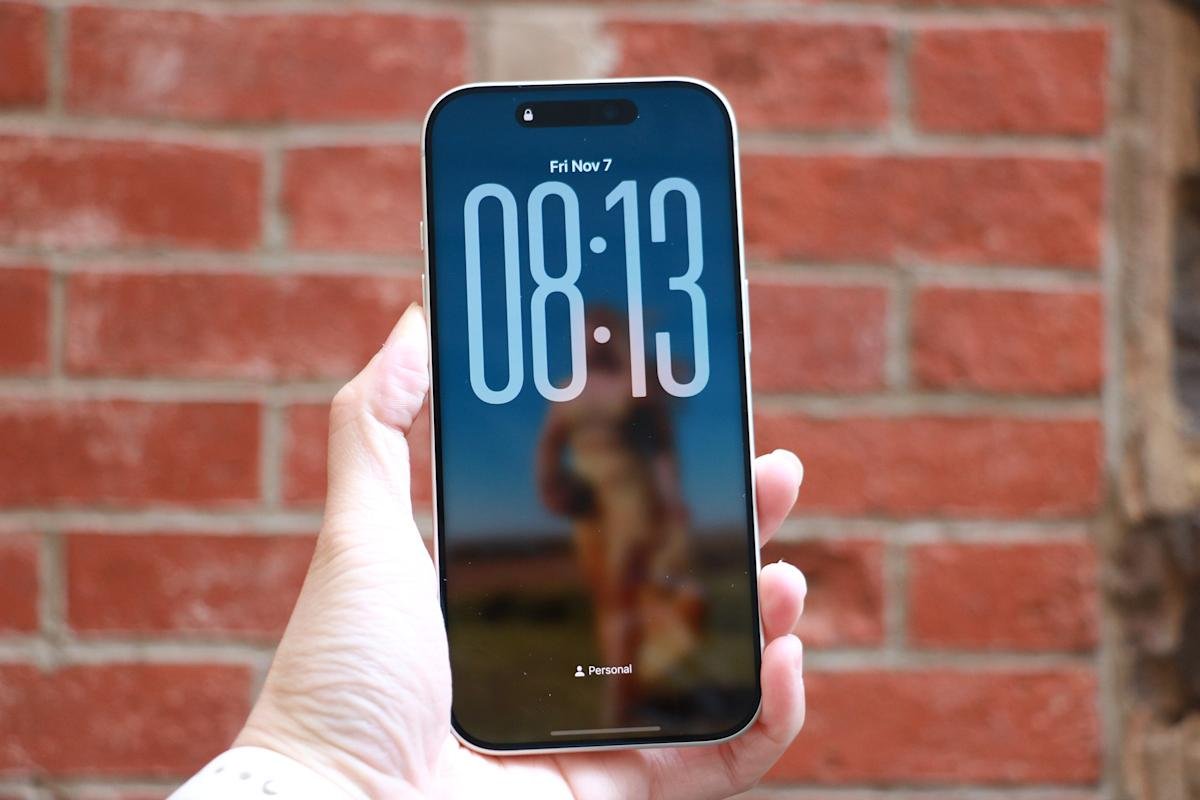
    Apple has continued its trend of giving users more creative freedom over how their iPhones look and feel, and one of the most striking new customization options in iOS 26 is the ability to stretch the clock on your lock screen. The feature, part of Apple’s refreshed design language for iPhone software, allows the time to expand across more of the screen, giving it a bold, modern appearance. Whether you prefer the minimalist look of small numerals or the dramatic impact of an oversized clock, iOS 26 makes it easy to adjust your lock screen style to suit your taste.

    This new resizing option is officially referred to as “adaptive time,” and it transforms what used to be a static lock-screen element into something that feels more fluid and responsive. By dragging a simple on-screen handle, you can expand or shrink the size of the time display, creating a distinctive visual effect that gives your lock screen a fresh new personality.

    How to stretch your lock-screen clock

    To access the stretch option, start by waking your iPhone and remaining on the lock screen. Instead of unlocking the device, press and hold anywhere on the display to enter customization mode. This brings up a carousel of your saved lock screens, allowing you to edit the one that’s currently active. Tap “Customize,” then choose the “Lock Screen” option to enter the editor.

    Once the editing screen appears, tap directly on the clock. This will bring up the familiar font and color panel introduced in earlier versions of iOS. To make the stretch feature available, the first font option (the default and leftmost style) must be selected. It should also be set to use the Arabic Western script. After confirming these settings, tap the clock again to close the font panel.

    If the wallpaper supports the feature, a small circular drag handle will appear in the lower-right corner of the clock. Touch and hold this handle, then drag it downward to stretch the clock. The digits will expand in real time as you move your finger. When you’re happy with the size, release the handle. To save your changes, tap “Done” in the top-right corner of the screen. Exiting customization mode will reveal your new, enlarged clock on the lock screen.

    If the stretch feature doesn’t appear, the issue is usually related to the font or wallpaper. Some wallpapers, particularly those with subjects that fill the upper portion of the frame, limit how much the clock can expand. If the image leaves little open space, iOS hides the handle to prevent the time from overlapping key parts of the photo. Switching to a simpler or more spacious wallpaper usually resolves this.

    Understanding the stretched clock feature

    In previous versions of iOS, the lock-screen clock was fixed in place. Regardless of the wallpaper used, its size and position remained the same. iOS 26 changes that by introducing a resize handle that appears on the bottom-right corner of the clock once the screen is in edit mode. When this handle is dragged downward, the digits expand, allowing the time to stretch dramatically toward the center of the screen. The feature works in both directions, meaning the clock can also be shrunk back to its previous size if the stretched look is too much for you.

    The stretched clock effect works best with the new Liquid Glass interface design Apple introduced in iOS 26. This approach blends the clock’s font with the background, creating a subtle depth effect where the time appears to hover over the wallpaper. However, the resizing tool is not available on every setup. It only works when specific conditions are met, including the use of the default clock font and the standard Arabic Western script. If any other font or script is selected, the stretch handle will not appear.

    iPhone iOS 26

    Cherlynn Low for Engadget

    Troubleshooting and limitations

    The stretch function in iOS 26 is a visual adjustment, not a full-scale redesign of the lock screen, and there are a few limitations to be aware of. It works only with the default clock font, and changing the typeface or script will remove the resize option entirely. Users who rely on different numeral styles or custom fonts won’t see the handle appear. Similarly, widgets can interfere with resizing if they occupy too much space beneath the clock. Removing them temporarily can make it easier to adjust the clock size.

    Some users have reported that the stretch handle disappears after software updates or when certain Focus modes are active. However, restarting your iPhone or disabling those modes typically restores it. As this is a relatively new feature, Apple may still be refining how it behaves across different iPhone models and lock-screen setups.

    The visual impact of the stretched clock depends largely on your wallpaper. Minimal backgrounds with clean space at the top allow the time to expand without cluttering the screen. Complex or busy images tend to reduce the effect, as the clock will automatically adjust its transparency and positioning to stay readable. The stretched design looks particularly polished on wallpapers that match Apple’s new Liquid Glass aesthetic, where colors subtly blend through the numerals for a semi-transparent glow.

    Making the most of your stretched clock

    While the stretch feature is primarily cosmetic, it contributes to the broader trend of personalization across iOS. Apple’s lock-screen customization tools now include options for widgets, depth-aware wallpapers, color filters and dynamic animations, giving users more control than ever over their device’s appearance. The stretched clock fits naturally into this toolkit, offering an easy way to change the entire mood of your lock screen in seconds.

    For users who prefer a bold, modern design, the larger clock size provides immediate impact and better visibility. Those who favor a more minimalist layout can keep it subtle by dragging the handle upward to restore the smaller, classic look. Whatever your preference, the process is reversible and quick, meaning you can experiment freely without losing your original layout.

    Apple’s focus with iOS 26 is clearly on personalization and polish. The stretched clock may seem like a small detail, but it captures the overall philosophy behind this update, blending design flexibility with simple, intuitive gestures. With just a few taps and a short drag, your iPhone’s lock screen can transform into something uniquely yours, whether that’s a subtle enhancement or a bold statement across the display.

    Share. Facebook Twitter Pinterest LinkedIn Tumblr Email
    mehedihasan9992
    • Website

    Related Posts

    Star Wars Outlaws developer Massive Entertainment and Ubisoft Stockholm face layoffs

    January 13, 2026

    Insta360 releases AI-powered follow-up to its Link webcams

    January 13, 2026

    Proton’s Lumo AI chatbot now has an encrypted space for your projects

    January 13, 2026

    The best streaming devices for 2026

    January 13, 2026

    UK regulator Ofcom opens a formal investigation into X over CSAM scandal

    January 13, 2026

    This ElevationLabs 10-year extended battery case for AirTags is on sale for only $16

    January 13, 2026
    Leave A Reply Cancel Reply

    Top Posts

    Steam and Valve’s online games are down

    December 24, 2025129 Views

    773,000-year-old fossils found in Casablanca may be earliest common ancestor of modern humans and Neanderthals

    January 8, 202696 Views

    Get three months of Apple Music for only $1 right now

    December 5, 202542 Views
    Don't Miss

    Reid Hoffman Wants Silicon Valley to ‘Stand Up’ Against the Trump Administration

    January 13, 2026

    Reid Hoffman doesn’t do much in half measures. He cofounded LinkedIn, of course, and helped…

    Smartphone Camera Scores Explained: Are DxOMark Rankings Really Reliable?

    January 13, 2026

    Samsung Pushes Galaxy Watch 8 (2025) to Its Lowest Price in New Year Clearance, While Apple Watches Stay Full Price

    January 13, 2026

    Hubble Nets Menagerie of Young Stellar Objects

    January 13, 2026
    Stay In Touch
    • Facebook
    • YouTube
    • TikTok
    • WhatsApp
    • Twitter
    • Instagram
    Latest Reviews
    8.9

    Review: Dell’s New Tablet PC Can Survive -20f And Drops

    January 15, 2021

    Review: Kia EV6 2022 The Best Electric Vehicle Ever?

    January 14, 2021
    72

    Review: Animation Software Business Share, Market Size and Growth

    January 14, 2021
    Most Popular

    Steam and Valve’s online games are down

    December 24, 2025129 Views

    773,000-year-old fossils found in Casablanca may be earliest common ancestor of modern humans and Neanderthals

    January 8, 202696 Views

    Get three months of Apple Music for only $1 right now

    December 5, 202542 Views
    Our Picks

    Reid Hoffman Wants Silicon Valley to ‘Stand Up’ Against the Trump Administration

    January 13, 2026

    Smartphone Camera Scores Explained: Are DxOMark Rankings Really Reliable?

    January 13, 2026

    Samsung Pushes Galaxy Watch 8 (2025) to Its Lowest Price in New Year Clearance, While Apple Watches Stay Full Price

    January 13, 2026

    Subscribe to Updates

    Get the latest creative news from FooBar about art, design and business.

    Toolcome
    Facebook X (Twitter) Instagram YouTube Mastodon Bluesky
    • Home
    • Technology
    • Gaming
    • Mobile Phones
    • Cars
    • PC Accessories
    © 2026 Tolcome.

    Type above and press Enter to search. Press Esc to cancel.