

A fresh edit button is heading to Memories
Memories has always been the low-effort corner of Google Photos, the auto-generated carousel of old photos and clips that greets you at the top of the app. Until now, your only real control was muting the audio or pulling out an image you did not want.We flagged an early attempt at editing inside Memories back in 2024, so the idea is not new. What is new is how much further this version goes.
A new report says a teardown of Google Photos (version 7.78.0.920664585) turned up an “Edit” button in the works for Memories. Tapping it opens an “Edit as video” sheet with two paths: edit inside Google Photos, or edit in CapCut.
The in-app route would finally let you set how long each photo or clip stays on screen, plus adjust the audio and add text overlays. It borrows the layout from the Highlight video tool already living in the Create tab.
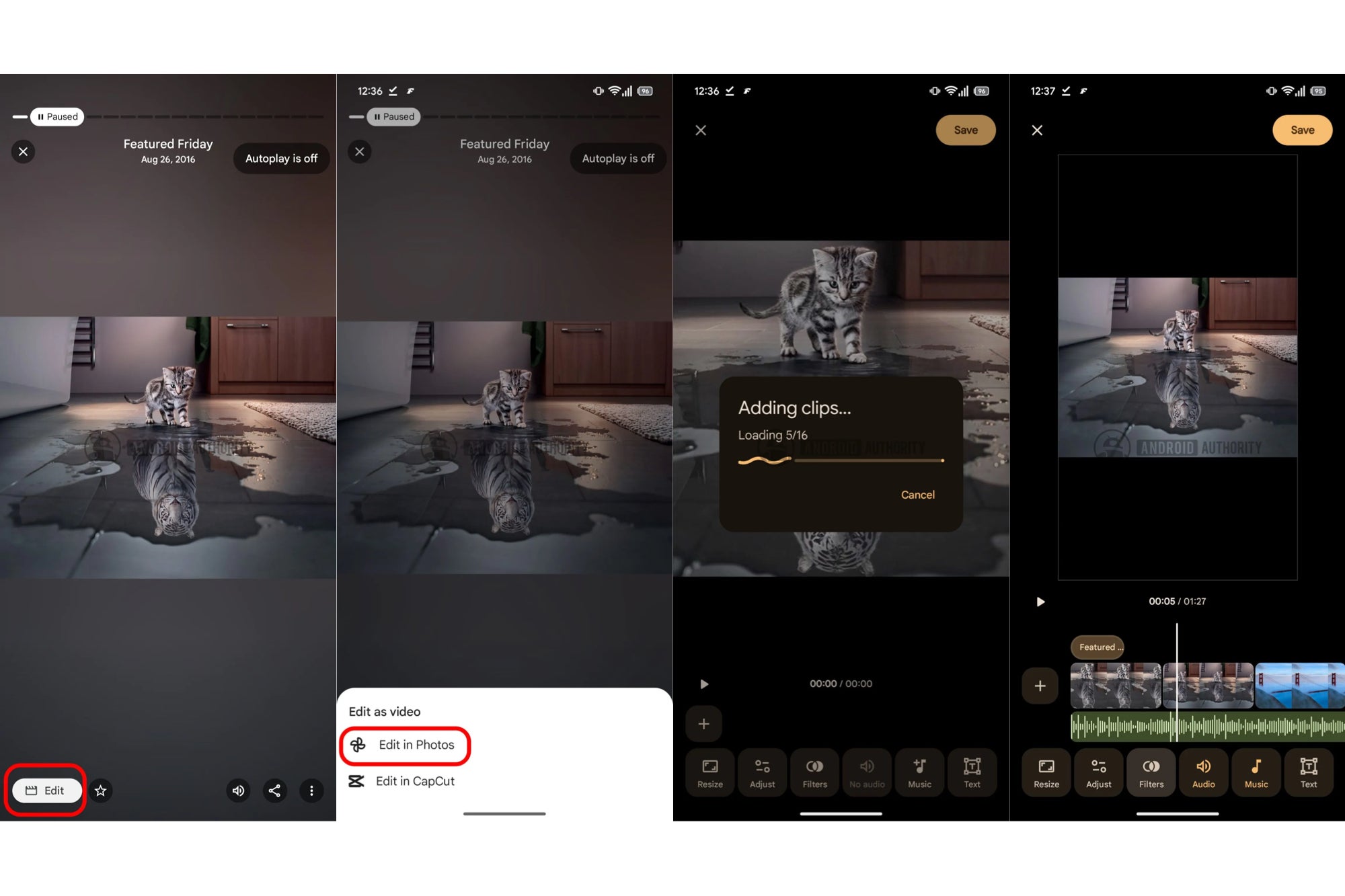
APK breakdown of the Google Photos app revealing an ‘Edit in Capcut’ workflow. | Image by Android Authority
Why CapCut is showing up in a Google app
Here is the part worth sitting with: CapCut belongs to ByteDance, the same company behind TikTok. Google is reportedly wiring a one-tap shortcut into a competitor’s editor right as it pushes its own video tools harder than ever.
The same report says Highlight video is also gaining image filters and new Fit or Fill options for framing. A separate teardown points to a “New for you” hub in the Create tab that would gather Google’s generative tools like Remix and Animation in one place.
What the handoff really signals
So why funnel people to CapCut at all? Google recently built its own templates aimed squarely at CapCut and TikTok, which makes this teardown read like a quiet admission that the in-house editor still cannot match a dedicated app.The kinder take is that it is smart hedging. Casual users get a fast in-app trim, and anyone who wants finer control gets a clean exit to CapCut without hunting through a share menu.
The feature pile is getting hard to ignore
For the record, I am all for the photo editing tools in Google Photos, since the AI cleanup features save me real time. Memories, though, is something I only reach for during the yearly recap.
A built-in video editor tucked inside it feels like a feature made for someone who is not me. Google keeps adding tools faster than people can find them, and at some point the app starts fighting its own simplicity.
None of this is locked in either. Teardowns show what Google is testing, not what ships, so treat the CapCut button as a maybe for now.
If you want more takes like this one, come find me on X and Threads, where I am always up for arguing about which Google features we really needed.
