


The new version of the Samsung Device Care system app has a new feature you might want
Unlike your typical app, which you find by looking for the icon in the app drawer, Samsung Device Care can be accessed through the Settings menu. Go to Settings > Device Care (or Battery and device care on older models). Or, you can use the search bar in Settings and type in “Device Care.”
Once opened, you’ll see tools for:
- Battery.
- Storage.
- Memory (RAM).
- Device protection.
- App optimization.
Toggle on the Excessive Ad Blocking feature to block apps that push out excessive ad notifications
The new version of Device Care features a toggle that will allow you to enable a feature known as Excessive Ad Blocking that detects and blocks third-party apps that hit users with “frequent advertisement alerts”. With the feature enabled, third-party apps that send frequent advertising alerts are put in deep sleep so that they can’t bother you with these notifications.
Apps in deep sleep can be viewed by going to Settings > Device care > Care report > Excessive alerts. There are two different options for blocking the apps spewing out excessive ad alerts. A “basic” setting uses Samsung’s own data to block these apps whenever they appear on your handset.
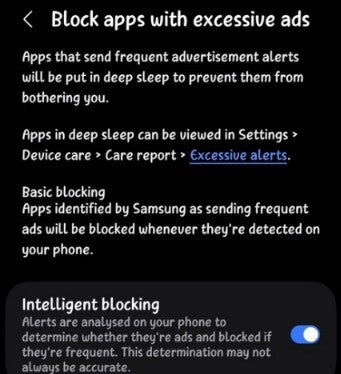
Settings menu for the new feature on the Device Care app.| Image by @KAILASH61229293
Virtual Memory has been around for years; I just think it is useful and cool
An “intelligent” setting analyzes the notifications to determine if they have something to do with advertisements. If they do, the offending apps are blocked since the system has thus determined that they are sending too many ads via notifications. Keep in mind that this feature is not an ad blocker, but when the setting is enabled, it recognizes apps and blocks them from sending notifications if they are sending excessive ad alerts.
An older feature allows you to free up RAM by shutting down apps running in the background by going to Settings > Device care > Memory > Clean now. Doing this will also help extend your phone’s battery life. Yeah, this feature has been available for years, unlike the new one that blocks apps from sending excessive ad notifications. Honestly, I just think that this is an interesting feature and wanted those not familiar with it to know that it is available.
Where to find the updated version of Device Care
If you want to prevent certain apps from shutting down in the background, you can go to the Memory menu and have them added to the Excluded apps list. Another cool feature on the Device Care app is called Virtual Memory, and it allows you to turn part of your phone’s internal storage into as much as 8 GB of RAM. Inactive apps are moved to the virtual memory freeing up physical RAM for active apps.
Devices that have been sent the stable One UI 8.5 update include:
