

The Google Find Hub app has many uses. With a tracker tag placed on an item, including a device, the app can help you find what is lost or misplaced and even have a sound played to help you pinpoint the correct location. If your phone is lost, you can remotely lock it down using the Find Hub app and require that it be unlocked only by using one of the Three Ps: Password, PIN, or Pattern.
New update to the Find Hub app adds a location notification feature
To receive a location notification via the Find Hub app, you’ll first need to update the app to version 3.1.608-5. To do that, open the Play Store app and tap the profile icon in the upper right corner. Tap Manage apps & device > Updates available > Update all.
You can then check to see whether your phone is running the right version by going to Settings > See all apps and scroll down to Find Hub. Tap on it, and you’ll be sent to the Find Hub App info page. Scroll to the very bottom, and you should see the version number of the app, which you want to be 3.1.608-5 or higher.
How to receive a location notification on the Find Hub app
The first time you open the app following the update, you will see a box containing information about adding a location notification. The text bubble reads: “Add a location notification: Get notified when someone arrives or leaves a location, like home or work.”
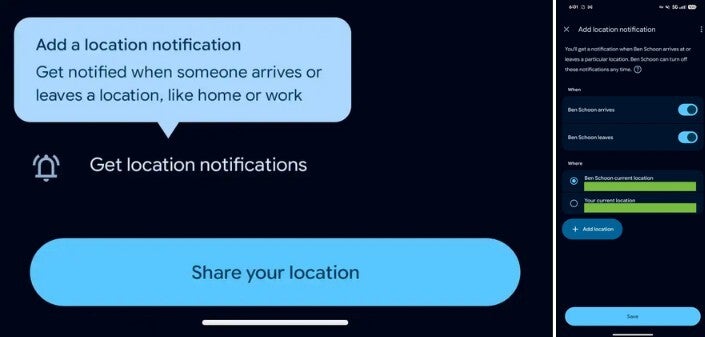
Setting up a location notification on the Find Hub Android app. | Image by 9to5Google
You can then select to be notified when this person leaves a location or arrives at a location. You can toggle on one or both options. Next, you will choose to be notified when that person arrives or leaves his current location, or your current location.
What to do when you want to set up additional location notifications
If you want a notification when this person arrives or leaves a different location, there is a button you can press to add a different location. Now you might find this to be particularly creepy, and yeah, it might be except for one thing. Once you hit the “save” button to lock in your choices, the person for whom you are receiving location notifications will receive a message alerting him that you are now being told when he leaves or arrives at a certain destination.
After you’ve set up this location notification and returned to the map on the Find Hub app, you’ll see which location notifications you’ve added. You will also have the opportunity to delete any of them or add a new one.
Where to get the Find Hub app if you don’t have it on your Android device
Even though the person you are tracking does get notified when you create a location notification setup for him, you still might want to mention that you plan on doing this. That makes it feel less like a creepy surprise when he receives that notification stating that you are being alerted when he arrives or departs a certain location.
