

Key Takeaways
- Workload Identity Federation lets AWS workloads authenticate to Google Cloud using short-lived tokens instead of static service account keys, eliminating credential rotation and leak risk entirely.
- Workload identity pools should be separated by environment so that a misconfigured or compromised provider stays contained to one environment rather than affecting everything.
- Federated identities can be granted IAM roles directly on GCP resources using principalSet://, which scales automatically as workload count grows without requiring additional IAM changes.
The fastest path to cross-cloud authentication is exporting a service account key and pasting it somewhere it doesn’t belong. It works every time, right up until it doesn’t, and by then you’ve lost track of where the key even lives. The Workload Identity Federation eliminates the key entirely. Your AWS workload proves who it is, GCP validates it, and a short-lived token does the work. Nothing to rotate, nothing to leak, nothing to explain six months later.
Why Service Account Keys Become a Problem
I’ve done it. Most people who’ve worked across AWS and GCP have done it at least once. You need a workload to talk to the other cloud, the deadline is real, and the fastest path is a service account key. You export it, paste it into a secret manager or an environment variable or honestly sometimes just a config file that definitely shouldn’t have it, and it works. It always works.
And then six months later someone asks where that key is, who still has access to it, when it was last rotated, and the answer to all three questions is some version of “I’m not sure.” We had a situation where a key had been copy-pasted into three different repos across two teams and nobody knew which one was the real one anymore. Recovery from that took longer than it should have and the conversation that preceded it was worse.
Workload Identity Federation is how you avoid that entirely. Your AWS workload authenticates using its existing IAM identity, exchanges it for a short-lived GCP token, and calls whatever GCP API it needs. No static credentials anywhere in that chain.
How It Actually Works
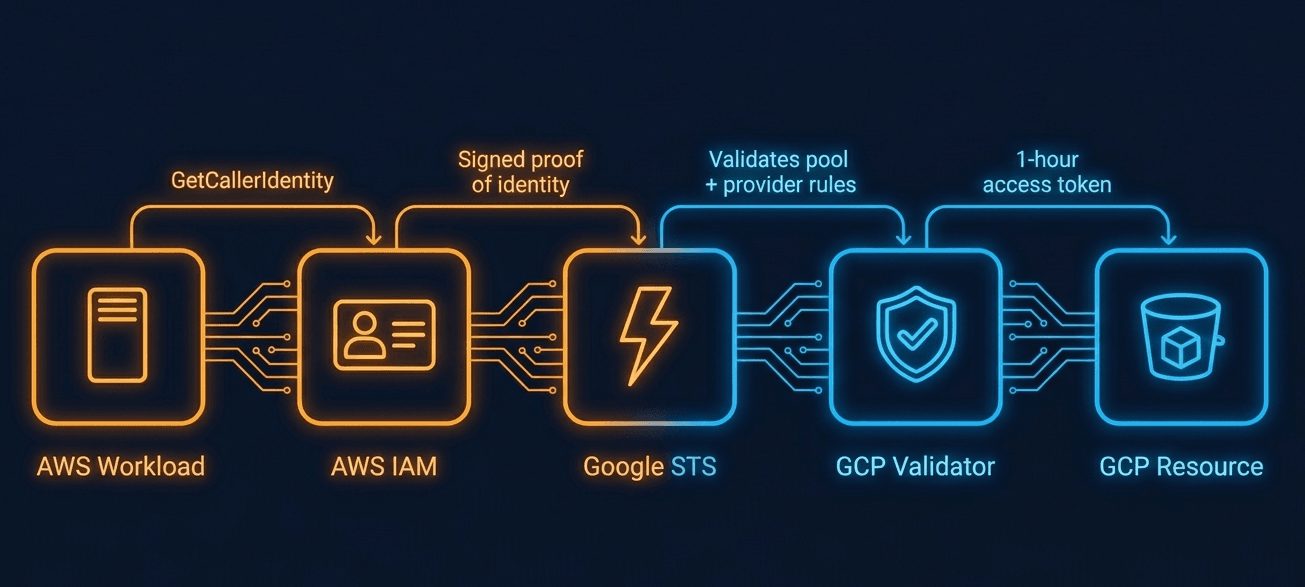
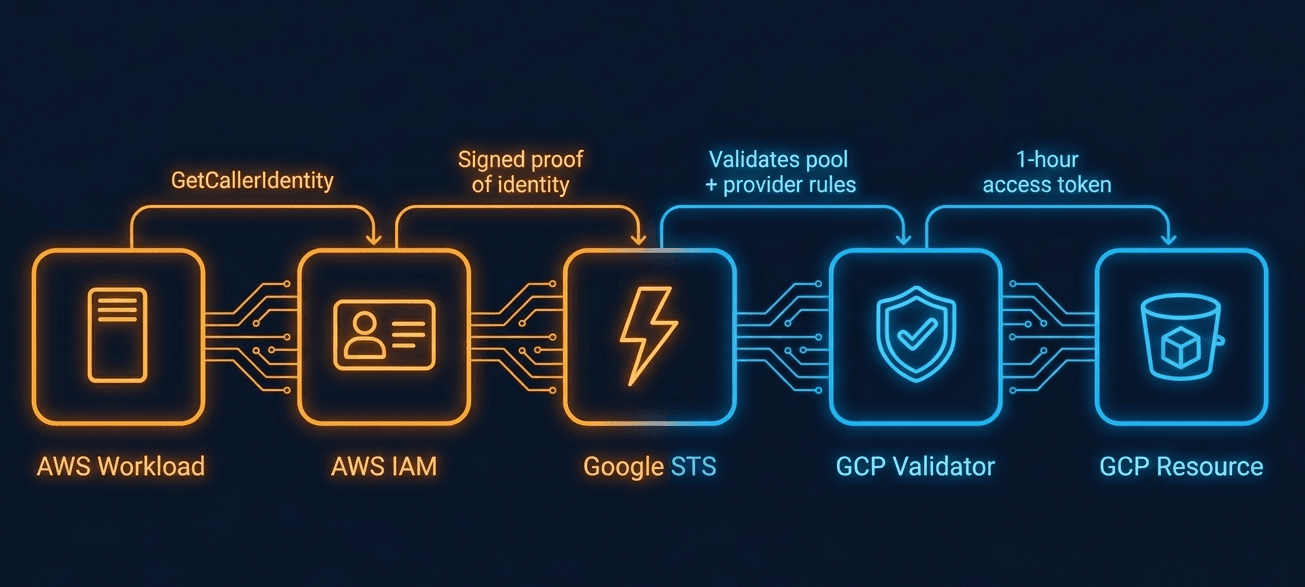
Your AWS workload already has an IAM identity, whether it’s running on EC2, Lambda, or ECS. It calls Google’s Security Token Service with a signed proof of that identity. GCP validates the signature against the provider rules you’ve configured, and if everything checks out, issues a one-hour access token. The workload uses that token to call GCP APIs and gets a fresh one when it expires.
The two clouds never actually hand anything to each other. The workload proves who it is, GCP decides what it can access, and the whole thing runs without a human in the loop. I still find this a bit surprising after setting it up several times, that it’s actually this clean end to end.
Before You Start
You will need:
- An AWS account with at least one IAM role assigned to a workload (EC2, Lambda, or ECS)
- A GCP project with billing enabled
- gcloud CLI installed and authenticated to your GCP project
- Basic familiarity with IAM concepts on both clouds
Before running any commands, enable the four APIs that WIF requires. Missing any one of them produces errors that don’t point back to the real cause:
gcloud services enable \
iam . googleapis . com \
cloudresourcemanager . googleapis . com \
sts . googleapis . com \
iamcredentials . googleapis . com
Step 1: Create a Workload Identity Pool
A workload identity pool is a trust boundary. It tells GCP which external identities it’s willing to accept tokens from.
The decision that matters most here is one most teams get wrong the first time: do not create a single pool for everything. Create one per environment. I know it feels like unnecessary overhead. It isn’t.
gcloud iam workload-identity-pools create aws-prod-pool \
–location=”global” \
–display-name=”AWS Production Pool” \
–description=”Federated identity pool for AWS production workloads”
Repeat this for aws-staging-pool and aws-dev-pool. It feels like busywork until a dev workload accidentally shares a role name with a prod one and you’re explaining to someone how it got production access at 11pm. Separate pools mean that mistakes stay contained. I’ve seen the single-pool approach produce audit trails that were genuinely impossible to untangle after the fact.
Verify it created cleanly:
gcloud iam workload-identity-pools describe aws-prod-pool \
–location=”global”
Step 2: Add an AWS Provider to the Pool
The provider is how GCP actually verifies incoming AWS identities. It validates the request signature, the IAM role, and the integrity of the assertion.
gcloud iam workload-identity-pools providers create-aws aws-provider \
–location=”global” \
–workload-identity-pool=”aws-prod-pool” \
–account-id=”YOUR_AWS_ACCOUNT_ID” \
–attribute-mapping=”google . subject=assertion . arn,attribute . aws_role=assertion . arn . extract(‘assumed-role/{role_name}/’)” \
–attribute-condition=”assertion . arn . startsWith(‘arn:aws:sts::YOUR_AWS_ACCOUNT_ID:assumed-role/gcp-deployer’)”
The attribute mapping translates AWS identity claims into something GCP can read. The google . subject field is required and needs to be unique per workload. Use the full AWS ARN. It’s stable and specific, and I’ve been burned using identifiers that looked stable but changed on every deployment and silently broke IAM bindings in ways that took hours to trace back.
The aws_role extraction lets you write clean IAM policies later without parsing ARNs every time. The placeholder name inside the curly braces, {role_name} here, is arbitrary – only the surrounding literal text matters for the extraction to work.
The attribute condition is your admission gate. A cryptographically valid token from the wrong workload still gets rejected here. The condition checks the raw ARN directly, tying the restriction to both the specific role name and your AWS account ID. Do not skip it. “Accept anything from this AWS account” sounds reasonable until a different team’s workload is reading your production storage bucket and nobody notices for three weeks. One line. Just add it.
Step 3: Bind the Federated Identity to a GCP Resource
Now you bind the federated identity to an actual GCP resource. This example grants read access to a Cloud Storage bucket, but the same pattern works for Pub/Sub, Artifact Registry, BigQuery, and most modern GCP services.
gcloud storage buckets add-iam-policy-binding gs://YOUR_BUCKET_NAME \
–member=”principalSet://iam . googleapis . com/projects/YOUR_PROJECT_NUMBER/locations/global/workloadIdentityPools/aws-prod-pool/attribute . aws_role/gcp-deployer” \
–role=”roles/storage . objectViewer”
principalSet:// is what makes this scale. You’re not hardcoding a single identity, you’re granting access to any identity in the pool that matches the attribute. A new AWS workload running under the same IAM role inherits access automatically, no IAM changes, no ticket, no delay. When you’re managing dozens of services that add up faster than you’d expect.
Step 4: Configure the Workload Side
On the AWS side, the workload calls GetCallerIdentity to generate a signed proof of its IAM identity, then hands that to Google STS. The GCP Auth Library handles the exchange automatically. You just need a credential config file that tells it where to find the AWS identity and how to use it.
If your workload runs on EC2, all new instances use IMDSv2 by default. Add the –enable-imdsv2 flag or the credential exchange will fail silently:
gcloud iam workload-identity-pools create-cred-config \
projects/YOUR_PROJECT_NUMBER/locations/global/workloadIdentityPools/aws-prod-pool/providers/aws-provider \
–aws \
–enable-imdsv2 \
–output-file=credentials . json
If your workload runs on Lambda or ECS rather than EC2, omit –enable-imdsv2 as it is EC2-specific.
On the workload:
export GOOGLE_APPLICATION_CREDENTIALS=/path/to/credentials . json
Every GCP SDK call from that point forward goes through the federation flow automatically. Tokens expire after one hour and refresh without intervention. No rotation schedule, no expiry alerts, no manual handling. This part is genuinely simpler than most people expect coming from a static key background.
Step 5: Verify the Setup in Cloud Logging
Before calling this done, confirm that federated authentications are showing up in your audit logs. Most tutorials skip this. It’s the step that matters when something breaks at 2am and you have no idea if the workload is even reaching GCP.
Data Access audit logging for STS is not enabled by default. Without it, no token exchange events will appear regardless of whether federation is working. Enable it first:
gcloud projects get-iam-policy YOUR_PROJECT_ID > policy.yaml
Add the following block under auditConfigs in policy . yaml:
auditConfigs:
– logType: DATA_READ
service: sts . googleapis . com
Apply it:
gcloud projects set-iam-policy YOUR_PROJECT_ID policy.yaml
Then query for token exchange events:
gcloud logging read \
‘protoPayload . methodName=”google . identity . sts . v1 . SecurityTokenService . ExchangeToken”‘ \
–project=YOUR_PROJECT_ID \
–limit=10 \
–format=json
You should see ExchangeToken events with your AWS ARN in the protoPayload . authenticationInfo . principalSubject field. If there’s nothing there after enabling Data Access logs and running a workload, check that all four APIs are enabled and that the credential config path is correct on the workload. I’ve debugged what I was convinced was a complex federation issue that turned out to be a wrong file path. Twice. Both times I spent way too long ruling out the wrong things first.
Common Configuration Mistakes to Avoid
**One Pool for All Environments: **I’ve seen this go wrong when a dev workload shared a role name with a prod one. The blast radius of that mistake is larger than it looks. Separate pools, every time.
**No Attribute Condition: **Without one, any workload in your AWS account can authenticate to your GCP project. The incident that follows is not a fun one to explain. One line prevents it.
**Instance-Specific Identifiers in google . subject: ** If your subject mapping includes something that changes per instance, like an instance ID or session name, your IAM bindings break on every new deployment. It produces failures that look like permission errors and aren’t. Anchor to the IAM role.
Missing APIs: WIF needs four: iam . googleapis . com, cloudresourcemanager . googleapis . com, iamcredentials . googleapis . com, and sts . googleapis . com. Missing one produces errors that don’t point back to the real cause. I’ve spent longer than I’d like to admit staring at permission denied errors that had nothing to do with permissions.
Forgetting to Enable Data Access Logs: Token exchange events don’t appear in Cloud Logging by default. If your audit log queries return nothing, this is the first thing to check, not your federation config.
There’s probably a sixth one I’m forgetting. There always is.
When Service Account Impersonation Is Still Necessary
Some older GCP APIs still require a service account principal and don’t accept federated identities directly. In those cases, the federated identity can impersonate a service account rather than accessing the resource directly.
gcloud iam service-accounts add-iam-policy-binding \
SA_NAME@PROJECT_ID . iam . gserviceaccount . com \
–member=”principalSet://iam . googleapis . com/projects/YOUR_PROJECT_NUMBER/locations/global/workloadIdentityPools/aws-prod-pool/attribute . aws_role/gcp-deployer” \
–role=”roles/iam . workloadIdentityUser”
Use this only where you actually need it. Every service account you introduce is another credential to govern. I don’t have a clean rule for which APIs still require it, honestly, so I try direct access first and fall back to impersonation if it fails. Direct resource access is simpler, more auditable, and should be your default.
Where to Go From Here
Once this is working for one workload, the pattern extends cleanly. GitHub Actions and GitLab CI both support WIF through OIDC providers. The pool and IAM structure is identical to what you built here, just with a different provider type. Managing pools and providers through Terraform is worth doing once you have more than two or three of them, mostly because the trust configuration is the kind of thing you really want in version control.
And once your federated workloads have been running stably for a few weeks, go revoke the service account keys you replaced. That’s the actual finish line. Everything before it is just set up.
Conclusion
Service account keys are a liability that compounds quietly. They spread across repos, pipelines, and config files until nobody knows where they all are. Workload Identity Federation does not just solve the rotation problem, it removes the credential entirely. Set it up once, verify it in your audit logs, revoke the old keys, and stop thinking about it.
Saurabh Ahuja is a Principal Member of Technical Staff at Salesforce, where he works on multi-cloud infrastructure. He has built platforms and reliability systems at Salesforce, Amazon, ZipRecruiter, and McAfee. Connect on LinkedIn.
